顯示具有 nodejs 標籤的文章。 顯示所有文章

2022年11月2日 星期三

CSS心得2022

Stylus

https://stackoverflow.com/a/66284049  "ERESOLVE unable to resolve dependency tree" when installing npm react-facebook-login
https://stackoverflow.com/a/65348395  Unable to resolve dependency tree error when installing npm packages


安裝

如果在 Vue心得2022  時沒有安裝Stylus,可以這樣安裝

$ npm install stylus stylus-loader --save-dev
npm ERR! code ERESOLVE
npm ERR! ERESOLVE could not resolve
npm ERR!
npm ERR! While resolving: @vue/eslint-config-standard@6.1.0
npm ERR! Found: eslint-plugin-vue@8.7.1
npm ERR! node_modules/eslint-plugin-vue
npm ERR!   dev eslint-plugin-vue@"^8.0.3" from the root project
npm ERR!
npm ERR! Could not resolve dependency:
npm ERR! peer eslint-plugin-vue@"^7.0.0" from @vue/eslint-config-standard@6.1.0
npm ERR! node_modules/@vue/eslint-config-standard
npm ERR!   dev @vue/eslint-config-standard@"^6.1.0" from the root project
npm ERR!
npm ERR! Conflicting peer dependency: eslint-plugin-vue@7.20.0
npm ERR! node_modules/eslint-plugin-vue
npm ERR!   peer eslint-plugin-vue@"^7.0.0" from @vue/eslint-config-standard@6.1.0
npm ERR!   node_modules/@vue/eslint-config-standard
npm ERR!     dev @vue/eslint-config-standard@"^6.1.0" from the root project
npm ERR!
npm ERR! Fix the upstream dependency conflict, or retry
npm ERR! this command with --force, or --legacy-peer-deps
npm ERR! to accept an incorrect (and potentially broken) dependency resolution.

這時候要加 --legacy-peer-deps(用nvm升級npm到 8.19.2 無效)

$ npm install stylus stylus-loader --save-dev --legacy-peer-deps
added 5 packages, changed 1 package, and audited 992 packages in 4s

126 packages are looking for funding
  run `npm fund` for details

found 0 vulnerabilities

npm audit

如果npm install --save 遇到類似錯誤(npm ERR! code ERESOLVE)也可以這樣處理
$ npm install --save --legacy-peer-deps
added 986 packages, and audited 987 packages in 47s

124 packages are looking for funding
  run `npm fund` for details

1 high severity vulnerability

To address all issues, run:
  npm audit fix

Run `npm audit` for details.

處理完發現有vulnerability,按照提示處理

$ npm audit
# npm audit report

terser  5.0.0 - 5.14.1
Severity: high
Terser insecure use of regular expressions before v4.8.1 and v5.14.2 leads to ReDoS - https://github.com/advisories/GHSA-4wf5-vphf-c2xc
fix available via `npm audit fix`
node_modules/terser

1 high severity vulnerability

To address all issues, run:
  npm audit fix

$ npm audit fix --legacy-peer-deps
changed 1 package, and audited 987 packages in 4s

124 packages are looking for funding
  run `npm fund` for details

found 0 vulnerabilities

npm audit fix 時也會遇到 code ERESOLVE 錯誤,一樣加 --legacy-peer-deps 處理

使用

diff --git a/src/views/TestView.vue b/src/views/TestView.vue
index 47f0bc6..b2504c3 100644
--- a/src/views/TestView.vue
+++ b/src/views/TestView.vue
@@ -63,6 +63,14 @@
         <div class="two"></div>
       </article>
     </section>
+    <div id="container">
+      <div id="header">Header contents</div>
+    </div>
+    <div id="wrapper-1">
+      <div id="container">
+        <div id="header">Header contents</div>
+      </div>
+    </div>
   </div>
 </template>
 
@@ -152,7 +160,7 @@ export default {
 }
 </script>
 
-<style scoped>
+<style scoped lang="stylus">
 #outer {
   background: aqua;
   text-align: left;
@@ -278,4 +286,15 @@ article {
   height: 30px;
 }
 
+#container {
+  #header {
+    background: salmon
+  }
+}
+
+#wrapper-1
+  #container
+    #header
+      background: burlywood
+
 </style>

s

在 <style> 加 lang="stylus",括號可有可無,加了才能在WebStorm - Move Caret to Matching Brace (Ctrl + M)。Stylus的擴展名是.styl


讓float的div和父div一樣高

https://stackoverflow.com/a/31528903  How to make a floated div 100% height of its parent?
子div:不要讓他float ,加 display: table-cell; 
父元素:加 display: table; 

#outer{
    display: table;
}
#inner {
    display: table-cell;
    float: none;
}
s

position: absolute 的父div高度

https://stackoverflow.com/a/13546011  Position: absolute and parent height?
https://stackoverflow.com/a/12071017  Make absolute positioned div expand parent div height

問題

position: absolute 的父div高度沒有height

diff --git a/src/views/TestView.vue b/src/views/TestView.vue
index b1c9159..f7d07e1 100644
--- a/src/views/TestView.vue
+++ b/src/views/TestView.vue
@@ -35,12 +35,34 @@
+    <section id="foo">
+      <header>Foo</header>
+      <article>
+        <div class="one"></div>
+        <div class="two"></div>
+      </article>
+    </section>
   </div>
 </template>
 
@@ -154,4 +176,106 @@ export default {
 .clear {
   clear: both;
 }
+article {
+  background: #0f0;
+  /*question*/
+  position: relative;
+}
+
+.one {
+  /*question*/
+  position: absolute;
+  top: 10px;
+  left: 10px;
+  background: red;
+  width: 30px;
+  height: 30px;
+}
+
+.two {
+  /*question*/
+  position: absolute;
+  top: 10px;
+  right: 10px;
+  background: blue;
+  width: 30px;
+  height: 30px;
+}
+
 </style>

s

10年前的解法(original)

diff --git a/src/views/TestView.vue b/src/views/TestView.vue
index b1c9159..f7d07e1 100644
--- a/src/views/TestView.vue
+++ b/src/views/TestView.vue
@@ -35,12 +35,34 @@
+    <section id="foo">
+      <header>Foo</header>
+      <article>
+        <div class="one"></div>
+        <div class="two"></div>
+      </article>
+    </section>
   </div>
 </template>
 
@@ -154,4 +176,106 @@ export default {
 .clear {
   clear: both;
 }
+article {
+  background: #0f0;
+  /*original*/
+  position: relative;
+  overflow: hidden;
+}
+
+.one {
+  /*original*/
+  position: relative;
+  float: left;
+  margin-top: 10px;
+  margin-left: 10px;
+  background: red;
+  width: 30px;
+  height: 30px;
+}
+
+.two {
+  /*original*/
+  position: relative;
+  float: right;
+  margin-top: 10px;
+  margin-right: 10px;
+  background: blue;
+  width: 30px;
+  height: 30px;
+}
+
 </style>

s

grid


因為10年前瀏覽器CSS佈局沒有grid和flex,我們現在可以用grid和flex
diff --git a/src/views/TestView.vue b/src/views/TestView.vue
index b1c9159..f7d07e1 100644
--- a/src/views/TestView.vue
+++ b/src/views/TestView.vue
@@ -35,12 +35,34 @@
+    <section id="foo">
+      <header>Foo</header>
+      <article>
+        <div class="one"></div>
+        <div class="two"></div>
+      </article>
+    </section>
   </div>
 </template>
 
@@ -154,4 +176,106 @@ export default {
 .clear {
   clear: both;
 }
+article {
+  background: #0f0;
+  /*grid*/
+  display: grid;
+  grid-template-columns: 30px auto 30px;
+  padding: 10px 10px 0;
+}
+
+.one {
+  /*grid*/
+  height: 30px;
+  background: red;
+  grid-column: 1/2;
+}
+
+.two {
+  /*grid*/
+  height: 30px;
+  background: blue;
+  grid-column: 3/4;
+}
+
 </style>

s


display: grid;  讓容器變成grid
grid-template-columns: 30px auto 30px;  行佈局3個grid,第一個寬度30px,第二個自動填充剩餘寬度,第三個寬度30px。必須在這設定grid寬度,在子div的item設置無效
padding: 10px 10px 0;  因為gap不含外圍,所以在容器上設padding
grid-column: 1/2; 設定.one從第1個位置開始到第2個位置結束
grid-column: 3/4; 設定.two從第3個位置開始到第4個位置結束(跳過2/3)


flex(推薦)

https://stackoverflow.com/a/35578723  Giving wrapped flexbox items vertical spacing
https://stackoverflow.com/a/31006659  Align an element to bottom with flexbox
https://stackoverflow.com/a/41440249  Flexbox Two Rows Two Columns
https://stackoverflow.com/a/19027949  Flexbox: center horizontally and vertically
https://stackoverflow.com/a/33049392  How to vertically align text inside a flexbox?


diff --git a/src/views/TestView.vue b/src/views/TestView.vue
index b1c9159..f7d07e1 100644
--- a/src/views/TestView.vue
+++ b/src/views/TestView.vue
@@ -35,12 +35,34 @@
+    <section id="foo">
+      <header>Foo</header>
+      <article>
+        <div class="one"></div>
+        <div class="two"></div>
+      </article>
+    </section>
   </div>
 </template>
 
@@ -154,4 +176,106 @@ export default {
 .clear {
   clear: both;
 }
+article {
+  background: #0f0;
+  /*flex*/
+  display: flex;
+  justify-content: space-between;
+}
+
+.one {
+  /*flex*/
+  margin-top: 10px;
+  margin-left: 10px;
+  background: red;
+  width: 30px;
+  height: 30px;
+}
+
+.two {
+  /*flex*/
+  margin-top: 10px;
+  margin-right: 10px;
+  background: blue;
+  width: 30px;
+  height: 30px;
+}
+
 </style>

s


display: flex;  讓容器變成flex
justify-content: space-between;  可以直接點chrome的Open flexbox editor去調


2022年6月13日 星期一

Vue心得2022

前言

寫了 Vue心得 之後,在這年又開始寫Vue了

版本

$ node -v
v16.13.1

$ npm -v
8.1.2

$ vue --version
@vue/cli 5.0.4

創建一個新項目

$ vue create vue2022

手動選擇

? Please pick a preset:
  Default ([Vue 3] babel, eslint) 
  Default ([Vue 2] babel, eslint) 
> Manually select features

選擇需要的feature

? Check the features needed for your project: (Press <space> to select, <a> to toggle all, <i> to invert selection, and <enter> to proceed)
 (*) Babel
 ( ) TypeScript
 ( ) Progressive Web App (PWA) Support
 (*) Router
>(*) Vuex
 ( ) CSS Pre-processors
 (*) Linter / Formatter
 ( ) Unit Testing
 ( ) E2E Testing

選擇vue版本

? Choose a version of Vue.js that you want to start the project with 
  3.x
> 2.x

使用history 模式

? Use history mode for router? (Requires proper server setup for index fallback in production) (Y/n) Y

選擇linter / formatter配置

? Pick a linter / formatter config: 
  ESLint with error prevention only 
  ESLint + Airbnb config
> ESLint + Standard config
  ESLint + Prettier


? Pick additional lint features: (Press <space> to select, <a> to toggle all, <i> to invert selection, and <enter> to proceed)
>(*) Lint on save
 ( ) Lint and fix on commit

配置文件

? Where do you prefer placing config for Babel, ESLint, etc.? (Use arrow keys)
> In dedicated config files
  In package.json


新建完專案後,會自動提交一個init的git commit


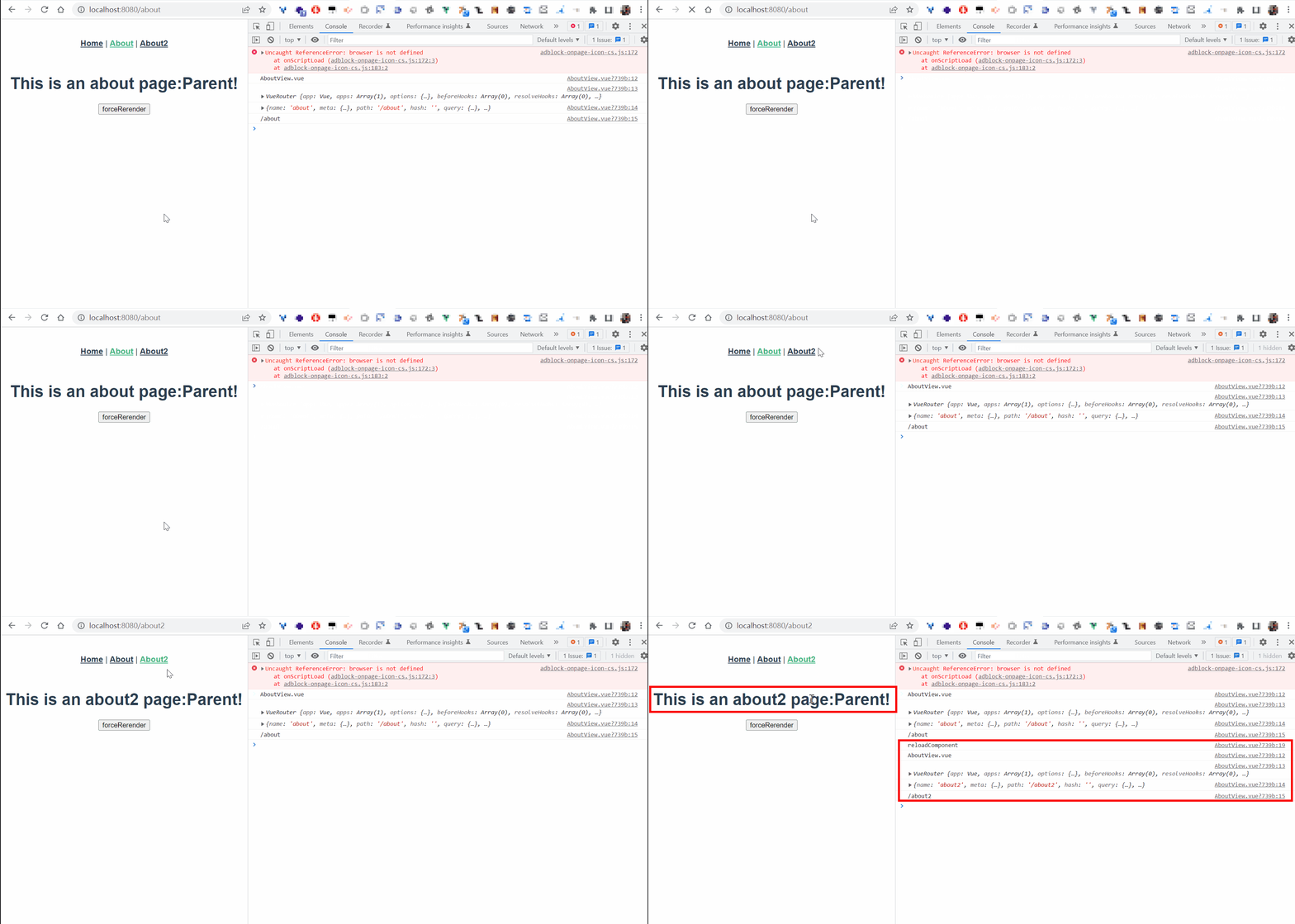
同組件路由切換時不重新渲染組件

如/about2 和 /about 都使用 views/AboutView.vue 組件:

diff --git a/src/App.vue b/src/App.vue
index 240acf4..2995013 100644
--- a/src/App.vue
+++ b/src/App.vue
@@ -2,7 +2,8 @@
   <div id="app">
     <nav>
       <router-link to="/">Home</router-link> |
-      <router-link to="/about">About</router-link>
+      <router-link to="/about">About</router-link> |
+      <router-link to="/about2">About2</router-link>
     </nav>
     <router-view/>
   </div>
diff --git a/src/router/index.js b/src/router/index.js
index a395a1f..5d09db5 100644
--- a/src/router/index.js
+++ b/src/router/index.js
@@ -17,6 +17,11 @@ const routes = [
     // this generates a separate chunk (about.[hash].js) for this route
     // which is lazy-loaded when the route is visited.
     component: () => import(/* webpackChunkName: "about" */ '../views/AboutView.vue')
+  },
+  {
+    path: '/about2',
+    name: 'about2',
+    component: () => import(/* webpackChunkName: "about" */ '../views/AboutView.vue')
   }
 ]
 
diff --git a/src/views/AboutView.vue b/src/views/AboutView.vue
index 3fa2807..16bb285 100644
--- a/src/views/AboutView.vue
+++ b/src/views/AboutView.vue
@@ -1,5 +1,17 @@
 <template>
   <div class="about">
-    <h1>This is an about page</h1>
+    <h1>This is an {{$route.name}} page</h1>
   </div>
 </template>
+
+<script>
+export default {
+  name: 'AboutView',
+  created () {
+    console.log('AboutView.vue')
+    console.log(this.$router)
+    console.log(this.$route)
+    console.log(this.$route.path)
+  }
+}
+</script>
s
切換路由時,組件的created不被呼叫

自動更新 - :key="$route.fullPath"

https://stackoverflow.com/a/51170320  Do we have router.reload in vue-router?
https://stackoverflow.com/a/49646063  Vue-router reload components
在組件上新增 :key="$route.fullPath"
diff --git a/src/App.vue b/src/App.vue
index 69ddd1a..4f3e76c 100644
--- a/src/App.vue
+++ b/src/App.vue
@@ -8,6 +8,7 @@
     <router-view
+      :key="$route.fullPath"/>
   </div>
 </template>
s

手動更新 - :key="componentKey"

https://stackoverflow.com/a/54367510  Can you force Vue.js to reload/re-render?

diff --git a/src/App.vue b/src/App.vue
index 4f3e76c..e4e7a4a 100644
--- a/src/App.vue
+++ b/src/App.vue
@@ -8,7 +8,8 @@
     <router-view
       :parentString="string"
       @reloadComponentEvent="emitReloadComponentEvent($event)"
+      :key="componentKey"
+      @forceRerenderEvent="emitForceRerenderEvent($event)"
       v-if="isRouterAlive"/>
   </div>
 </template>
@@ -18,7 +19,8 @@ export default {
   data () {
     return {
       isRouterAlive: true,
+      componentKey: 0
     }
   },
   methods: {
@@ -28,6 +30,14 @@ export default {
     },
     emitReloadComponentEvent () {
       this.reload()
+    },
+    forceRerender () {
+      this.componentKey += 1
+    },
+    emitForceRerenderEvent (name) {
+      console.log('emitForceRerenderEvent')
+      console.log(name)
+      this.forceRerender()
     }
   }
 }
diff --git a/src/views/AboutView.vue b/src/views/AboutView.vue
index fafb0f5..7678eb2 100644
--- a/src/views/AboutView.vue
+++ b/src/views/AboutView.vue
@@ -1,6 +1,7 @@
 <template>
   <div class="about">
     <h1 @click="reloadComponent">This is an {{$route.name}} page:{{parentString}}</h1>
+    <button @click="clickForceRerender">forceRerender</button>
   </div>
 </template>
 
@@ -17,6 +18,10 @@ export default {
     reloadComponent () {
       console.log('reloadComponent')
       this.$emit('reloadComponentEvent', this.$route.name)
+    },
+    clickForceRerender () {
+      console.log('forceRerender')
+      this.$emit('forceRerenderEvent', this.$route.name)
     }
   },
   props: {
s

手動更新 - this.$nextTick()

https://www.zhihu.com/question/49863095/answer/289157209  请问vue组件如何reload或者说vue-router如何刷新当前的route??

diff --git a/src/App.vue b/src/App.vue
index 2995013..3eb8189 100644
--- a/src/App.vue
+++ b/src/App.vue
@@ -5,10 +5,31 @@
       <router-link to="/about">About</router-link> |
       <router-link to="/about2">About2</router-link>
     </nav>
-    <router-view/>
+    <router-view
+      @reloadComponentEvent="emitReloadComponentEvent($event)"
+      v-if="isRouterAlive"/>
   </div>
 </template>
 
+<script>
+export default {
+  data () {
+    return {
+      isRouterAlive: true
+    }
+  },
+  methods: {
+    reload () {
+      this.isRouterAlive = false
+      this.$nextTick(() => (this.isRouterAlive = true))
+    },
+    emitReloadComponentEvent () {
+      this.reload()
+    }
+  }
+}
+</script>
+
 <style>
 #app {
   font-family: Avenir, Helvetica, Arial, sans-serif;
diff --git a/src/views/AboutView.vue b/src/views/AboutView.vue
index 16bb285..545956a 100644
--- a/src/views/AboutView.vue
+++ b/src/views/AboutView.vue
@@ -1,6 +1,6 @@
 <template>
   <div class="about">
-    <h1>This is an {{$route.name}} page</h1>
+    <h1 @click="reloadComponent">This is an {{$route.name}} page</h1>
   </div>
 </template>
 
@@ -12,6 +12,12 @@ export default {
     console.log(this.$router)
     console.log(this.$route)
     console.log(this.$route.path)
+  },
+  methods: {
+    reloadComponent () {
+      console.log('reloadComponent')
+      this.$emit('reloadComponentEvent', this.$route.name)
+    }
   }
 }
 </script>
s

特定路由被緩存

https://www.jianshu.com/p/0b0222954483  vue-router 之 keep-alive
指定首頁(home)緩存 => 即不重新渲染,HomeView.vue不重複呼叫created()
about、about2不緩存 => about、about2需用不同組件(component)

diff --git a/src/App.vue b/src/App.vue
index eda18d3..588bafb 100644
--- a/src/App.vue
+++ b/src/App.vue
@@ -5,12 +5,14 @@
       <router-link to="/about">About</router-link> |
       <router-link to="/about2">About2</router-link>
     </nav>
+    <keep-alive>
+      <router-view v-if="$route.meta.keepAlive">
+        <!-- 这里是会被缓存的视图组件,比如 home -->
+      </router-view>
+    </keep-alive>
+    <router-view v-if="!$route.meta.keepAlive">
+      <!-- 这里是不被缓存的视图组件,比如 about、about2 -->
+    </router-view>
   </div>
 </template>
 
diff --git a/src/components/HelloWorld.vue b/src/components/HelloWorld.vue
index 1c544cb..f59096c 100644
--- a/src/components/HelloWorld.vue
+++ b/src/components/HelloWorld.vue
@@ -37,6 +37,9 @@ export default {
   name: 'HelloWorld',
   props: {
     msg: String
+  },
+  created () {
+    console.log('HelloWorld.vue')
   }
 }
 </script>
diff --git a/src/router/index.js b/src/router/index.js
index 5d09db5..1b097c7 100644
--- a/src/router/index.js
+++ b/src/router/index.js
@@ -8,7 +8,10 @@ const routes = [
   {
     path: '/',
     name: 'home',
+    component: HomeView,
+    meta: {
+      keepAlive: true // 需要被缓存
+    }
   },
   {
     path: '/about',
@@ -16,12 +19,18 @@ const routes = [
   {
     path: '/about',
     name: 'about',
-    component: () => import(/* webpackChunkName: "about" */ '../views/AboutView.vue')
+    component: () => import(/* webpackChunkName: "about" */ '../views/AboutView.vue'),
+    meta: {
+      keepAlive: false // 不需要被缓存
+    }
   },
   {
     path: '/about2',
     name: 'about2',
-    component: () => import(/* webpackChunkName: "about" */ '../views/AboutView.vue')
+    component: () => import(/* webpackChunkName: "about" */ '../views/About2View.vue'),
+    meta: {
+      keepAlive: false // 不需要被缓存
+    }
   }
 ]
 
diff --git a/src/views/About2View.vue b/src/views/About2View.vue
new file mode 100644
index 0000000..28f3639
--- /dev/null
+++ b/src/views/About2View.vue
@@ -0,0 +1,18 @@
+<template>
+  <div class="about">
+    <h1>This is an {{$route.name}} page:</h1>
+    <button>forceRerender</button>
+  </div>
+</template>
+
+<script>
+export default {
+  name: 'About2View',
+  created () {
+    console.log('About2View.vue')
+    console.log(this.$router)
+    console.log(this.$route)
+    console.log(this.$route.path)
+  }
+}
+</script>
diff --git a/src/views/HomeView.vue b/src/views/HomeView.vue
index e8d96d7..2eca718 100644
--- a/src/views/HomeView.vue
+++ b/src/views/HomeView.vue
@@ -13,6 +13,9 @@ export default {
   name: 'HomeView',
   components: {
     HelloWorld
+  },
+  created () {
+    console.log('HomeView.vue')
   }
 }
 </script>
s

組件間溝通


父傳子(props)

diff --git a/src/components/ChildComponent.vue b/src/components/ChildComponent.vue
index e47d61b..7e2b2fe 100644
--- a/src/components/ChildComponent.vue
+++ b/src/components/ChildComponent.vue
@@ -1,12 +1,22 @@
 <template>
   <div class="child">
     ChildComponent
+    <div>{{obj.title}}</div>
+    <div>{{obj.content}}</div>
   </div>
 </template>
 
 <script>
 export default {
-  name: 'ChildComponent'
+  name: 'ChildComponent',
+  props: {
+    obj: {
+      type: Object,
+      default: function () {
+        return {}
+      }
+    }
+  }
 }
 </script>
 
diff --git a/src/views/ParentView.vue b/src/views/ParentView.vue
index adb9021..304371a 100644
--- a/src/views/ParentView.vue
+++ b/src/views/ParentView.vue
@@ -6,7 +6,9 @@
       <div id="right">right<br>right line 2</div>
       <div class="clear"></div>
     </div>
-    <child-component></child-component>
+    <child-component
+      :obj="singleObj"
+    ></child-component>
   </div>
 </template>
 
@@ -16,6 +18,14 @@ import ChildComponent from '@/components/ChildComponent'
 export default {
   name: 'ParentView',
   components: { ChildComponent },
+  data () {
+    return {
+      singleObj: {
+        title: 'props',
+        content: '父傳子'
+      }
+    }
+  },
   created () {
     console.log('ParentView.vue')
   }
s

子傳父(event emitter)


diff --git a/src/components/ChildComponent.vue b/src/components/ChildComponent.vue
index 7e2b2fe..45920ee 100644
--- a/src/components/ChildComponent.vue
+++ b/src/components/ChildComponent.vue
@@ -3,12 +3,18 @@
     ChildComponent
     <div>{{obj.title}}</div>
     <div>{{obj.content}}</div>
+    <button @click="callParent">子傳父</button>
   </div>
 </template>
 
 <script>
 export default {
   name: 'ChildComponent',
+  data () {
+    return {
+      count: 0
+    }
+  },
   props: {
     obj: {
       type: Object,
@@ -16,6 +22,12 @@ export default {
         return {}
       }
     }
+  },
+  methods: {
+    callParent () {
+      this.count++
+      this.$emit('callParentEvent', this.count)
+    }
   }
 }
 </script>
diff --git a/src/views/ParentView.vue b/src/views/ParentView.vue
index 304371a..0b2cfdd 100644
--- a/src/views/ParentView.vue
+++ b/src/views/ParentView.vue
@@ -8,7 +8,9 @@
     </div>
     <child-component
       :obj="singleObj"
+      @callParentEvent="callMe($event)"
     ></child-component>
+    <div>{{parentCount}}</div>
   </div>
 </template>
 
@@ -23,11 +25,18 @@ export default {
       singleObj: {
         title: 'props',
         content: '父傳子'
-      }
+      },
+      parentCount: null
     }
   },
   created () {
     console.log('ParentView.vue')
+  },
+  methods: {
+    callMe (count) {
+      console.log(count)
+      this.parentCount = count
+    }
   }
 }
 </script>
s

<div>{{parentCount}}</div> 

https://stackoverflow.com/a/43858500  Why doesn't the data get updated in Vue Dev Tools?
為什麼Vue Dev Tools裡面的data不更新?
因為頁面沒變,所以加入 <div>{{parentCount}}</div>  把畫面更新,Vue Dev Tools裡面的data才會更新

:key

https://stackoverflow.com/a/51541950  What does the colon represent inside a VueJS/Vuetify/HTML component tag
:key 是 v-bind:key 的簡寫

@符號

https://stackoverflow.com/a/58313986  What does the @ symbol do in Vue.js?
標籤裡的@符號是 v-on 的簡寫


VUEX

版本

"vue": "^2.6.14",
"vuex": "^3.6.2"

設定state


diff --git a/src/store/index.js b/src/store/index.js
index ceffa8e..c0deccd 100644
--- a/src/store/index.js
+++ b/src/store/index.js
@@ -1,17 +1,26 @@
+import { COUNT_MUTATION } from '@/store/mutation-types'
 
 Vue.use(Vuex)
 
 export default new Vuex.Store({
   state: {
+    count: 0
   },
   getters: {
   },
   mutations: {
+    [COUNT_MUTATION] (state, n) {
+      state.count += n
+    }
   },
   actions: {
   },
diff --git a/src/store/mutation-types.js b/src/store/mutation-types.js
new file mode 100644
index 0000000..492a305
--- /dev/null
+++ b/src/store/mutation-types.js
@@ -0,0 +1,2 @@
+export const COUNT_MUTATION = 'COUNT_MUTATION'
diff --git a/src/views/TestView.vue b/src/views/TestView.vue
index 0b2cfdd..e3e3708 100644
--- a/src/views/TestView.vue
+++ b/src/views/TestView.vue
@@ -1,21 +1,27 @@
 <template>
   <div>
     <div>TestView.vue</div>
+    <div @click="increase(1)">increase 1</div>
+    <div @click="increase(2)">increase 2</div>
   </div>
 </template>
 
 <script>
 import ChildComponent from '@/components/ChildComponent'
+import store from '@/store'
 
 export default {
   name: 'TestView',
@@ -36,7 +42,19 @@ export default {
     callMe (count) {
       console.log(count)
       this.parentCount = count
+    },
+    increase (n) {
+      store.commit('COUNT_MUTATION', n)
+    }
   }
 }
 </script>

s

獲取state

通過屬性訪問(store.getters.countInGetters)或mapGetters輔助函數

diff --git a/src/store/index.js b/src/store/index.js
index a0bfcb7..24dff6e 100644
--- a/src/store/index.js
+++ b/src/store/index.js
@@ -8,6 +8,9 @@ export default new Vuex.Store({
     count: 0
   },
   getters: {
+    countInGetters (state) {
+      return state.count
+    }
   },
   mutations: {
     increment (state, n) {
diff --git a/src/views/TestView.vue b/src/views/TestView.vue
index 3b4e0b9..3e8272f 100644
--- a/src/views/TestView.vue
+++ b/src/views/TestView.vue
@@ -14,12 +14,14 @@
     <div>{{parentCount}}</div>
     <div @click="increase(1)">increase 1</div>
     <div @click="increase(2)">increase 2</div>
+    <div @click="testGetter()">test</div>
   </div>
 </template>
 
 <script>
 import ChildComponent from '@/components/ChildComponent'
 import store from '@/store'
+import { mapGetters } from 'vuex'
 
 export default {
   name: 'TestView',
@@ -43,7 +45,16 @@ export default {
     },
     increase (n) {
       store.commit('increment', n)
+    },
+    testGetter () {
+      console.log(store.getters.countInGetters)
+      console.log(this.countInGetters)
     }
+  },
+  computed: {
+    ...mapGetters([
+      'countInGetters'
+    ])
   }
 }
 </script>

s

createLogger 插件

diff --git a/src/store/index.js b/src/store/index.js
index 24dff6e..c856f10 100644
--- a/src/store/index.js
+++ b/src/store/index.js
@@ -1,5 +1,5 @@
 import Vue from 'vue'
-import Vuex from 'vuex'
+import Vuex, { createLogger } from 'vuex'
 
 Vue.use(Vuex)
 
@@ -20,5 +20,6 @@ export default new Vuex.Store({
   actions: {
   },
   modules: {
-  }
+  },
+  plugins: [createLogger()]
 })

s

lodash

檢查object有沒有key

https://stackoverflow.com/a/43096892  Checking if a key exists in a JavaScript object?
vue 2 內建lodash,直接import

diff --git a/src/views/TestView.vue b/src/views/TestView.vue
index e3e3708..79024b7 100644
--- a/src/views/TestView.vue
+++ b/src/views/TestView.vue
@@ -22,6 +22,7 @@
 import ChildComponent from '@/components/ChildComponent'
 import store from '@/store'
 import { mapGetters } from 'vuex'
+import _ from 'lodash'
 
 export default {
   name: 'TestView',
@@ -32,11 +33,26 @@ export default {
         title: 'props',
         content: '父傳子'
       },
-      parentCount: null
+      parentCount: null,
+      todos: [
+        {
+          id: 1,
+          text: 'text 1',
+          done: true
+        },
+        {
+          id: 2,
+          text: 'text 2',
+          done: false
+        }
+      ]
     }
   },
   created () {
     console.log('TestView.vue')
+    console.log(_.get(this.todos, '0.text')) // text 1
+    console.log(_.get(this.todos, '1.id')) // 2
+    console.log(_.get(this.todos, '2.id')) // undefined
   },
   methods: {
     callMe (count) {

s

彈窗modal

使用到的特性:組件,prop 傳遞,插槽 (slot),過渡 (transitions)
https://vuejs.org/examples/#modal  Modal with Transitions

或是直接用現成插件 vue2-simplert-plugin 或 mint-ui的Message box


ModalComponent.vue

<template>
  <Transition name="modal">
    <div v-if="show" class="modal-mask">
      <div class="modal-wrapper">
        <div class="modal-container">
          <div class="modal-header">
            <slot name="header">default header</slot>
          </div>

          <div class="modal-body">
            <slot name="body">default body</slot>
          </div>

          <div class="modal-footer">
            <slot name="footer">
              default footer
              <button
                class="modal-default-button"
                @click="$emit('close')"
              >OK
              </button>
            </slot>
          </div>
        </div>
      </div>
    </div>
  </Transition>
</template>

<script>
export default {
  name: 'ModalComponent',
  props: {
    show: Boolean
  }
}
</script>

<style scoped>
.modal-mask {
  position: fixed;
  z-index: 9998;
  top: 0;
  left: 0;
  width: 100%;
  height: 100%;
  background-color: rgba(0, 0, 0, 0.5);
  display: table;
  transition: opacity 0.3s ease;
}

.modal-wrapper {
  display: table-cell;
  vertical-align: middle;
}

.modal-container {
  width: 300px;
  margin: 0px auto;
  padding: 20px 30px;
  background-color: #fff;
  border-radius: 2px;
  box-shadow: 0 2px 8px rgba(0, 0, 0, 0.33);
  transition: all 0.3s ease;
}

.modal-header h3 {
  margin-top: 0;
  color: #42b983;
}

.modal-body {
  margin: 20px 0;
}

.modal-default-button {
  float: right;
}

/*
 * The following styles are auto-applied to elements with
 * transition="modal" when their visibility is toggled
 * by Vue.js.
 *
 * You can easily play with the modal transition by editing
 * these styles.
 */

.modal-enter-from {
  opacity: 0;
}

.modal-leave-to {
  opacity: 0;
}

.modal-enter-from .modal-container,
.modal-leave-to .modal-container {
  -webkit-transform: scale(1.1);
  transform: scale(1.1);
}
</style>

s
name: 'ModalComponent',  組件名字必須是多個單字,否則要在 .eslintrc.js 加入  'vue/multi-word-component-names': 'off'
https://stackoverflow.com/a/72144014  Component name "Temp" should always be multi-word vue/multi-word-component-names
<slot name="header">default header</slot>  組件內的具名插槽


TestView.vue

diff --git a/src/views/TestView.vue b/src/views/TestView.vue
index d9c5d70..b79c879 100644
--- a/src/views/TestView.vue
+++ b/src/views/TestView.vue
@@ -12,9 +12,28 @@
       @callParentEvent="callMe($event)"
     ></child-component>
     <div>{{parentCount}}</div>
+    <button id="show-modal" @click="showModal = true">Show Modal</button>
+    <!-- use the modal component, pass in the prop -->
+    <modal-component :show="showModal" @close="showModal = false">
+      <template v-slot:header>
+        <h3>custom header1,  {{ slotProps.user.firstName }}</h3>
+      </template>
+    </modal-component>
   </div>
 </template>
 
@@ -23,10 +42,14 @@ import ChildComponent from '@/components/ChildComponent'
 import store from '@/store'
 import { mapGetters } from 'vuex'
 import _ from 'lodash'
+import ModalComponent from '@/components/ModalComponent'
 
 export default {
   name: 'TestView',
+  components: {
+    ModalComponent
+  },
   data () {
     return {
       singleObj: {
@@ -45,7 +68,15 @@ export default {
           text: 'text 2',
           done: false
         }
-      ]
+      ],
+      showModal: false
     }
   },
   created () {

s
具名插槽 v-slot:header 可簡寫成 #header (WebStorm都會自動提示插槽名)。slot="header"是2.6.0 起被廢棄的寫法


.eslintrc.js

允許空白行

   rules: {
+    'no-trailing-spaces': 'off',


其他語法

v-if和v-else不要html標籤

https://stackoverflow.com/a/49218055  How to use v-if and v-else without any html tag or else
<template v-if="condition">
</template>
<template v-else>
</template>

倒計時

https://stackoverflow.com/a/59923858  How do I create a simple 10 seconds countdown in Vue.js
<template>
    {{ timerCount }}
</template>
<script>
    export default {
        data() {
            return {
                timerCount: 30
            }
        },
        watch: {
            timerCount: {
                handler(value) {
                    if (value > 0) {
                        setTimeout(() => {
                            this.timerCount--;
                        }, 1000);
                    }
                },
                immediate: true // This ensures the watcher is triggered upon creation
            }
        }
    }
</script>
s




2022年1月8日 星期六

scoop 和nvm 使用心得

安裝scoop

scoop是 Windows 軟件管理器
需使用 Windows PowerShell 安裝
PS C:\Users\user> iwr -useb get.scoop.sh | iex
For example, to set the execution policy to 'RemoteSigned' please run :
'Set-ExecutionPolicy RemoteSigned -scope CurrentUser'

如果Windows PowerShell報錯中文亂碼

https://superuser.com/a/653716  How do I change my cmd.exe to English?
使用 chcp 可以查當前的code,然後切換成英文
C:\Users\user> chcp 437
Active code page: 437

如果報錯則執行

PS C:\Users\user> Set-ExecutionPolicy RemoteSigned -scope CurrentUser
Execution Policy Change
The execution policy helps protect you from scripts that you do not trust. Changing the execution policy might expose
you to the security risks described in the about_Execution_Policies help topic at
https:/go.microsoft.com/fwlink/?LinkID=135170. Do you want to change the execution policy?
[Y] Yes  [A] Yes to All  [N] No  [L] No to All  [S] Suspend  [?] Help (default is "N"): Y

再試一次

PS C:\Users\user> iwr -useb get.scoop.sh | iex
Initializing...
Downloading scoop...
Extracting...
Creating shim...
Downloading main bucket...
Extracting...
Adding ~\scoop\shims to your path.
'lastupdate' has been set to '2022-01-08T20:48:03.5639640+08:00'
Scoop was installed successfully!
Type 'scoop help' for instructions.

測試

PS C:\Users\user> scoop help
Usage: scoop <command> [<args>]

Some useful commands are:

alias       Manage scoop aliases
bucket      Manage Scoop buckets
cache       Show or clear the download cache
cat         Show content of specified manifest.
checkup     Check for potential problems
cleanup     Cleanup apps by removing old versions
config      Get or set configuration values
create      Create a custom app manifest
depends     List dependencies for an app
export      Exports (an importable) list of installed apps
help        Show help for a command
hold        Hold an app to disable updates
home        Opens the app homepage
info        Display information about an app
install     Install apps
list        List installed apps
prefix      Returns the path to the specified app
reset       Reset an app to resolve conflicts
search      Search available apps
status      Show status and check for new app versions
unhold      Unhold an app to enable updates
uninstall   Uninstall an app
update      Update apps, or Scoop itself
virustotal  Look for app's hash on virustotal.com
which       Locate a shim/executable (similar to 'which' on Linux)

Type 'scoop help <command>' to get help for a specific command.

如果安裝時報SSL錯誤

可能是你IE版本太舊,在 Windows PowerShell 嘗試使用以下命令解決
[Net.ServicePointManager]::SecurityProtocol = [Net.SecurityProtocolType]::Tls12

安裝社區提供的 bucket

https://sspai.com/post/52710  给 Scoop 加上这些软件仓库,让它变成强大的 Windows 软件管理器
(可以在git bash裡執行)
$ scoop bucket add dorado https://github.com/h404bi/dorado
Checking repo... ok
The dorado bucket was added successfully.

scoop的目錄就是裝在 ~/scoop 下
~/scoop
$ ls
apps/  buckets/  shims/

安裝APP

scoop install dorado/<App 名>
$ scoop install dorado/redis-desktop-manager

查已安裝的APP

$ scoop list
Installed apps:

  7zip 21.07 [main]
  redis-desktop-manager 2021.10 [dorado]

使用scoop安裝nvm

$ scoop install main/nvm

$ nvm -v
Running version 1.1.9.
...

因為我的nodejs是官網msi安裝檔裝的,實際測試使用scoop 安裝的nvm無法切換新的nodejs版本,所以移除scoop安裝的nvm
$ scoop uninstall nvm

為什麼要安裝nvm

https://stackoverflow.com/a/64820435  Is there any way to fix package-lock.json lockfileVersion so npm uses a specific format?
因為兩個不同開發者用了不同版本的nodejs(14/16)和npm在同一個項目,造成新版本nodejs在npm install 時package-lock.json會產生 "lockfileVersion": 2 


安裝nvm

https://github.com/nvm-sh/nvm  Node Version Manager
預設安裝到 C:\Users\user\AppData\Roaming\nvm ,會偵測到系統的nodejs 目錄 C:\Program Files\nodejs
安裝完設定環境變量

然後就能正常切換nodejs版本
$ node -v
v14.17.5

安裝nodejs 16

$ nvm install 16
Downloading node.js version 16.13.1 (64-bit)...
Extracting...
Complete
Installation complete. If you want to use this version, type
nvm use 16.13.1

$ nvm list
    16.13.1
  * 14.17.5 (Currently using 64-bit executable)

$ nvm use 16.13.1

$ node -v
v16.13.1


2020年4月16日 星期四

Vue心得

安裝nodejs和npm

https://tecadmin.net/install-latest-nodejs-and-npm-on-centos/  How To Install Latest Nodejs on CentOS/RHEL 7

新增Node.js Yum Repository - Stable 版本(12.x)

# yum install -y gcc-c++ make
# curl -sL https://rpm.nodesource.com/setup_12.x | sudo -E bash -

安裝Node.js

# yum install nodejs

檢查 Node.js 和 NPM 版本

# node -v
v12.16.2
# npm -v
6.14.4

npm命令自動完成

$ npm completion >> ~/.bashrc
$ . ~/.bashrc


升級npm


npm i 就是npm install,只是簡寫
https://stackoverflow.com/questions/6237295/how-can-i-update-nodejs-and-npm-to-the-next-versions  How can I update NodeJS and NPM to the next versions?
# npm install -g npm

安裝/升級Vue Cli

https://cli.vuejs.org/zh/guide/installation.html
# npm install -g @vue/cli
...
-g : 同--global ,global模式安裝,將會安裝到 /usr/lib/node_modules/@vue/cli 下

檢查版本

# vue --version
@vue/cli 4.3.1

npm install的--save是什麼意思

https://stackoverflow.com/a/19578808  What is the --save option for npm install?
npm 5.0.0 後預設將modules裝在dependency,所以 --save 已經不再需要了。另外--save-dev將套件存在devDependencies、--save-optional將套件存在optionalDependencies


創建一個新項目

https://ithelp.ithome.com.tw/articles/10222966  Day28 vue.js - Vue cli 3.0 環境建置

$ vue create hello-world

手動選取要 preset (預先裝置) 的特性

? Please pick a preset:
  default (babel, eslint)
❯ Manually select features

選取要安裝的特性 (用space多選)

預設選了Babel、Linter / Formatter
? Check the features needed for your project: (Press <space> to select, <a> to toggle all, <i> to invert selection)
 ◉ Babel
 ◯ TypeScript
 ◯ Progressive Web App (PWA) Support
 ◉ Router
 ◉ Vuex
 ◉ CSS Pre-processors
 ◉ Linter / Formatter
 ◯ Unit Testing
 ◯ E2E Testing

Babel : JavaScript 編譯器、轉譯器。
Router : Vue 的路由器
Vuex vuex(vue的狀態管理模式)
CSS Pre-processors : CSS 前處理器(如:less、sass)
Linter / Formatter : 程式碼風格檢查和格式化(如:ESlint)

是否使用 Router 歷史記錄模式

? Use history mode for router? (Requires proper server setup for index fallback in production) (Y/n) Y
history 模式,這種模式充分利用 -history.pushState API 來完成 URL 跳轉而無須重新加載頁面。

css預先處理器

? Pick a CSS pre-processor (PostCSS, Autoprefixer and CSS Modules are supported by default): (Use arrow keys)
❯ Sass/SCSS (with dart-sass)
  Sass/SCSS (with node-sass)
  Less
  Stylus

https://stackoverflow.com/a/56422541  Vue CLI CSS pre-processor option: dart-sass VS node-sass?  
簡單說選 dart-sass而不是node-sass 的原因:官方推薦、比較快

ESLint 協助讓你寫的程式符合規範的輔助工具,區分嚴謹程度

? Pick a linter / formatter config:
  ESLint with error prevention only
  ESLint + Airbnb config
❯ ESLint + Standard config
  ESLint + Prettier

提示錯誤的時間點

? Pick additional lint features: (Press <space> to select, <a> to toggle all, <i> to invert selection)
❯◉ Lint on save
 ◯ Lint and fix on commit

配置文件怎麼放

? Where do you prefer placing config for Babel, ESLint, etc.? (Use arrow keys)
❯ In dedicated config files
  In package.json

是否將上述配置儲存到 preset 的 default

? Save this as a preset for future projects? (y/N) N

運行專案項目(開發用)

$ cd hello-world
$ npm run serve

運營專案指定端口

https://cli.vuejs.org/zh/config/#devserver
新增 vue.config.js
所有 webpack-dev-server 的选项 都支持。 vue.config.js 加入:
module.exports = {
  devServer: {
    port: 8100
  }
}
s
然後就能以  http://192.168.1.x:8100/ 訪問專案(當然server 8100端口防火牆要記得開)

關閉ESLint

https://stackoverflow.com/questions/49121110/how-to-disable-eslint-on-vue-cli-3  How to disable eslint on vue-cli 3?
vue.config.js 新增
module.exports = {
    chainWebpack: config => {
        config.module.rules.delete('eslint');
    }
}
這樣 npm run serve 時就不會做 eslint 檢查
WebStorm => Settings => Languages & Frameworks => Javascript => Code Quality Tools => ESLint => 勾選 Disable ESLint

用vue-native-websocket做長連結

https://juejin.im/post/5dd4ebdff265da47c8603e02   9012年末,带你快速上手vue-native-websocket

使用Mint-ui

https://zhuanlan.zhihu.com/p/61403630  2019最受欢迎的前端7个UI框架
https://juejin.im/post/5d674d87e51d4561fa2ec0a6  基于Vue CLI3 搭建五脏俱全的移动端H5应用


安裝

$ npm i mint-ui

使用

src/views/Test.vue:
import Vue from 'vue'
import Mint from 'mint-ui'
import 'mint-ui/lib/style.css'

Vue.use(Mint)
Mint.Toast('提示信息2')
s
或
import Vue from 'vue'
import Toast from 'mint-ui/lib/toast'
import 'mint-ui/lib/toast/style.css'

Vue.component(Toast.name, Toast)
Toast('提示信息4')
s
或安裝 babel-plugin-component ,可自動加載css
$ npm i babel-plugin-component -D
然後修改 babel.config.js
module.exports = {
  presets: [
    '@vue/cli-plugin-babel/preset'
  ],
  "plugins": [
    ["component", {
      "libraryName": "mint-ui",
      "style": true
    }]
  ]
}

需重新 npm run serve ,就可以這樣使用
import Vue from 'vue'
import { Cell, Checklist, Toast } from 'mint-ui'

Vue.component(Toast.name, Toast)
Toast('提示信息3')
s

打包項目到dist目錄

$ npm run build

如果在Windows上報錯

'vue-cli-service' 不是内部或外部命令,也不是可运行的程序

原因

node_modules/ 是在 CentOS上npm install的,專案在Windows卻不能 npm run serve、build

解法

https://github.com/vuejs/vue-cli/issues/1119#issuecomment-382105533  vue-cli-service does not run in cmd.exe or Powershell
在Windows 上刪除 node_modules/ 後重新 npm install

使用Vant

因為 mint-ui 已經2年以上沒更新了,改用還有在更新的vant
https://youzan.github.io/vant/#/zh-CN/quickstart  快速上手
https://github.com/youzan/vant  youzan/vant

安裝Vant

$ npm i vant -S

檢查已安裝插件的版本

$ npm list vant
hello-world@0.1.0 C:\Users\user\WebstormProjects\hello-world
`-- vant@2.6.3

使用

diff --git a/src/views/About.vue b/src/views/About.vue
 <template>
   <div class="about">
     <h1>This is an about page</h1>
+    <van-button type="primary">主要按钮2</van-button>
   </div>
 </template>
+<script>
+import Vue from 'vue'
+import Button from 'vant/lib/button'
+import 'vant/lib/button/style'
+Vue.component(Button.name, Button)
+export default {
+}
+</script>

Vue.component(Button.name, Button) - 沒引入會報錯 [Vue warn]: Unknown custom element: <van-button> - did you register the component correctly? For recursive components, make sure to provide the "name" option.
https://github.com/youzan/vant/issues/359#issuecomment-347491408  全局注册的组件在单文件中不识别 #359
chenjiahan: Vue.use 是注册插件用的,注册组件请使用 Vue.component
export default {} - 沒寫會報錯 TypeError: Cannot set property 'render' of undefined
https://stackoverflow.com/a/51021896  Cannot set property 'render' of undefined

自動引入style

安裝babel-plugin-import 插件
$ npm i babel-plugin-import -D

babel 7 在 babel.config.js 配置
diff --git a/babel.config.js b/babel.config.js
   plugins: [
     ['component', {
       libraryName: 'mint-ui',
       style: true
     }],
+    ['import', {
+      libraryName: 'vant',
+      libraryDirectory: 'es',
+      style: true
+    }, 'vant']
   ]
 }
一定要用 babel-plugin-import,用 babel-plugin-component 會報錯
Module not found: Error: Can't resolve 'vant/lib/toast/style.css' in

import Vue from 'vue'
import { Button } from 'vant'
Vue.component(Button.name, Button)
export default {
}
就是少寫import css那一行

ps. https://www.npmjs.com/package/@vue/cli-plugin-babel  @vue/cli-plugin-babel
@vue/cli-plugin-babel 使用 Babel 7

修正Cordova中字體文件路徑錯誤

環境: vant@2.6.3 和 cordova@9.0.0
https://github.com/youzan/vant/issues/2366  file://协议下加载字体文件路径错误 #2366
https://stackoverflow.com/q/14575208  Using css font-face in a Phonegap Windows Phone 8 app

Tabbar 上的圖是用 vant-icon-db1de1.woff2 畫出來的,但在cordova中一樣因為 file:// 協議的關係,使得字型缺失
vant-icon-db1de1.woff2 是在 node_modules/vant/es/icon/index.css 的 @font-face 中請求 https://img.yzcdn.cn/vant/vant-icon-db1de1.woff2 來的

解法

將 vant-icon-db1de1.woff2 下載到本地  src/assets/vant-icon-db1de1.woff2 。 src/App.vue 加入( 從node_modules/vant/es/icon/index.css 的 @font-face 粘過來修改)
@font-face {
  font-weight: 400;
  font-family: vant-icon;
  font-style: normal;
  font-display: auto;
  src: url("assets/vant-icon-db1de1.woff2") format('woff2')
}
即可